Actions with Commitments
In this section
See also
Contract commitments are shown in a service contract. To carry out any actions with them, you need to have the Working with contract commitments permission from the Subjects → Other permissions section.
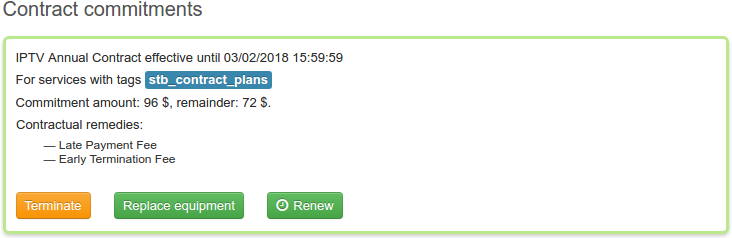
The list of available actions depends on the commitment status. An active commitment can be terminated early, renewed, or modified by changing equipment in it.
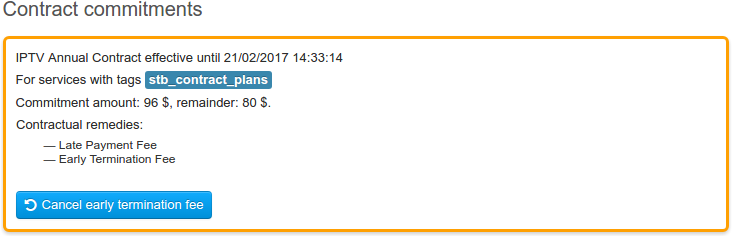
For a commitment with the Awaiting payment status you can cancel charging an early termination fee.
For commitments with Fulfilled and Canceled statuses, no actions are available.
Early Termination of a Commitment
When you click Terminate, a commitment is terminated on the current date. An early termination fee is charged to the customer account. In addition, you can choose the type of the fee, different from the one specified in the contract terms. For example, instead of returning the commitment amount remainder, you can demand that a customer is to pay for the minimum period.
If a customer has sufficient funds to pay off all receivables, the commitment transfers into the Fulfilled status. Otherwise, it is transferred into the Awaiting payment status.
If there is a trial period specified in the contract terms, and it is not over yet, then the contract commitment is canceled. No early termination fee is charged to the customer account. The subscription to the contract price plan is closed, and all charge logs for it are canceled.
Renewing a Commitment
Click Renew to extend the contract period for a customer:
-
an active contract commitment is then terminated without charging an early termination fee,
-
the corresponding subscription and the current charge log are closed,
-
a new contract commitment is created on the old contract terms, and
-
a new subscription is created for the same price plan with the same equipment.
As a result, the customer continues using the service, and both the contract period and repayment of the commitment amount start anew.
For example, a customer has a two-year contract price plan which is almost over. The contract plan is outdated and unavailable anymore, its price it lower than for current price plans. A customer can request the operator to retain the old price plan. The operator may agree, on the condition that the customer continues using it for two more years. In this case, you can simply renew the customer's current contract commitment.
Equipment Replacement
You can change the equipment which is used for a contract price plan. For example, you may replace a WiMAX modem under the warranty.
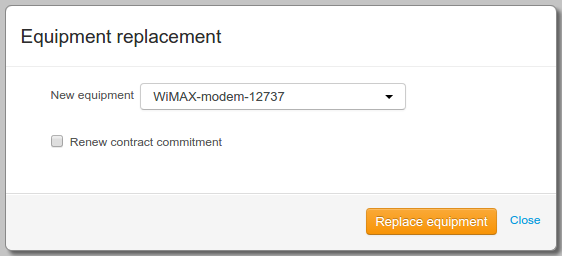
Add a new equipment for a customer. It should have the Active status and should not be used in any subscriptions to services. Click Replace equipment in the commitment, and choose the new equipment from the list.
The following happens when you do it:
-
the subscription that uses the previous equipment and the current charge log close,
-
a new subscription is created for the same service, but now with the new equipment,
-
a charge log is issued for the new subscription, and
-
the old equipment is transferred into the Deregistered status.
Note than the contract period and the commitment amount remainder are not changed.
If you select the Renew contract commitment check box, then, together with creating a new subscription, a new contract commitment is created. It is based on the same terms as the current one. The current commitment is terminated without charging an early termination fee. In this case, the contract period and repayment of the commitment amount start anew. For example, you can use this scheme when replacing equipment with some modern (or more expensive) analogue.
Canceling an Early Termination Fee
To carry out this action, you need to be granted not only the Manage contract commitments permission, but also the Cancel early termination fee permission from the Subjects → Other permissions section.
If a commitment has the Awaiting payment status, and an early termination fee has already been charged to the customer account, then you can cancel charging this fee on the customer's request, and resume the commitment.
After the customer pays off overdue receivables for the price plan and the fees, click Cancel early termination fee. The commitment then becomes Active, and the charge log with the early termination fee is canceled. In addition, the resumption service is charged, if it is set up in the contract terms (in this case, the customer is to have sufficient funds not only to pay off the receivables, but also to pay for this service). The customer then continues using the price plan on the old terms.