Service Providing Schemes
In this section
See also
A service providing scheme is a set of parameters and rules that describe conditions and methods for the services to be provided to customers.
Changing parameters in a service providing scheme that has already been used to issue charge logs which are currently in force may cause irrecoverable errors in rating and even lead to customer disconnection. If you need to edit such a scheme you should copy it first and add necessary changes to the copy. Then you should apply the newly created scheme to the service. Learn more in the how-to for changing providing parameters.
On the Administration menu click Service Providing Schemes to open the service providing schemes registry.
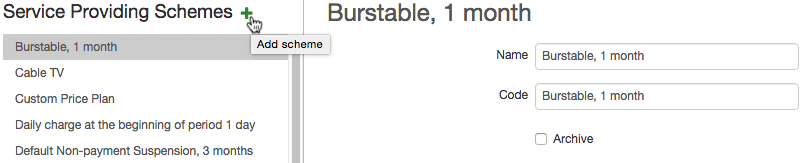
To create a service providing scheme, click  . Enter its code and name, fill in the parameters for providing services (they can be edited after the scheme is created), and click Add.
You can also create a scheme on the basis of an existing one by choosing it and clicking Copy.
The Archived check box is selected for schemes that are obsolete and no services are provided according to them any longer. A scheme can be archived only if services using it are not included in any price specifications that are currently in force or will be in future. Archived schemes are unavailable for choosing in service settings.
Saving obsolete schemes and selecting the Archived check box allows decreasing the list of available schemes in the product catalog (thus decreasing the chances to select a wrong one), and still providing an opportunity to re-rate services retroactively.
Service Providing Parameters
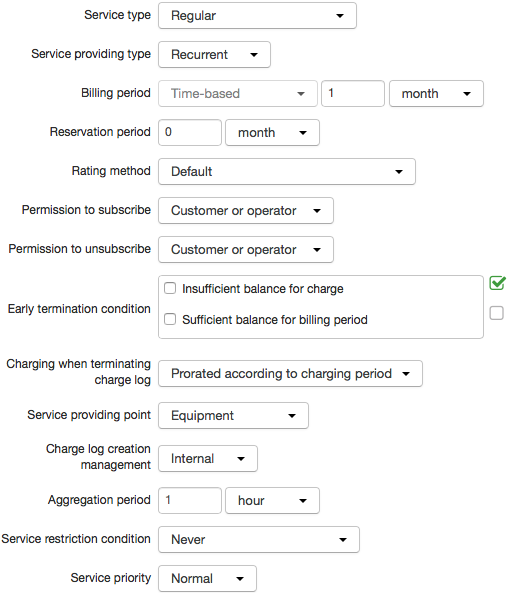
You are to set the following parameters for providing services:
-
Service type — this parameter defines main characteristics of a service. Find out more about service types in Concepts and Terms; learn more about services of the Temporary suspension and Non-payment suspension type in this section.
-
Service providing type — a service can be one-off (one-time) or recurrent, i.e. provided to a customer with a predetermined period (for example, every month).
-
Billing period — a set of parameters specifying the service providing terms, i.e. the way the service is provided in the course of time: either instantly (the begin date is the same as the end one) or during some period of time, so that a charge log is issued accordingly.
If a service billing period is one month it means a calendar month, not a 30-day period. In case the begin date falls on December 29 the next period starts on January 29, then, if it is a leap year, comes February 29, otherwise — February 28. And if the service billing period starts on the last day of the month, the begin date in the next period falls on the last day of the next month. For example, a begin date falls on February 28 of a non-leap year, so the next billing period will begin on March 31.
-
Reservation period — a parameter defining a time span for reserving funds on a customer's account to pay for a service. Reserved funds belong to a customer, however cannot be used to pay for any other services.
A reservation period cannot be shorter than a charging period or longer than a billing period of a service. If a customer has insufficient funds to pay for the whole reservation period, then all remaining funds will be reserved only for this service. As soon as any additional funds arrive at the account the system will reserve the deficient amount.
The amount of reserved funds is shown on the customer's page in the Current reserved amount column of the Accounts table.
-
Rating method — a method for an additional rating of a service. We recommend that on your own you choose only the Default value. If it is necessary to use some special rating method you should first consult with our tech support.
-
Permission to subscribe — a parameter that defines who has the permission to subscribe a customer to a service: the operator via the Service Provider Console or the customer via the Customer Self-Care Portal.
If you specify the Operator only value, the service will be available to choose only in the Service Provider Console (a recurrent service — in subscription, a one-off service — in one-off services). When choosing the Customer or operator value a service will be available not only in the Service Provider Console, but also in the Customer Self-Care Portal. The No one value is used for services of the Non-payment suspension type, and also can be applied to archived price plans. When choosing it the service will not be listed in available ones both for the customer and the operator.
-
Permission to unsubscribe — a parameter that defines who has the permission to unsubscribe a customer from a service, and is used only for recurrent services. Operator only: an operator can set the subscription end date in the Service Provider Console. Customer of operator: an operator can set the subscription end date, and a customer will be able to change this service (a price plan) for another one in the Customer Self-Care Portal, thus setting an end date for a current subscription. No one: neither an operator in the Service Provider Console nor a customer in the Customer Self-Care Portal will be able to set the end date in the service subscription (for example, non can change the current price plan).
The Permission to subscribe and Permission to unsubscribe parameters never affect access services or early termination of charge logs. These parameters are used only when working with subscriptions to services.
-
Early termination condition — a list of conditions for terminating a current charge log earlier than its planned end date. Fulfilling these conditions is checked by the Closing and putting in force charge logs task at the moment of the next charging.
-
Charging when terminating charge log — a parameter that defines the way funds are charged from a customer account at the moment of an early charge log termination (for example, due to insufficient funds or an immediate changing for a different price plan). The Full value means that if providing a service is terminated early funds are charged off a customer account in the amount equal to the cost of a full billing period of the service.
When choosing the Prorated according to charging period value funds are charged not for the whole billing period but only for the time span calculated from the billing period begin date with precision to a charging period and rounded up. For example, if a billing period is one year, a charging period is one month, and after two months and one week a customer decides to terminate the service, he or she is to pay for three charging periods, i.e. 3 months.
If the value is set to Prorated hourly/daily, funds are charged for the days (hours) calculated from the billing period begin date and rounded up.
-
Service providing point — this parameter can have one of the 3 values: Equipment — is used for services bound to certain equipment, for example, to a customer's computer or to a port of a VPV concentrator; Not specified — is used for services provided without any equipment, for example, laying cables or technician's visits, etc.; Can be specified — is used rarely only if necessary.
-
Charge log creation management — this parameter shows if charge logs for a service are issued by the Preparing charge logs for recurrent services task (the Internal value) or by some side agent (the External value).
-
Aggregation period — a parameter that defines how often details on consumed services are recorded in a charge log. Aggregation works as follows. Details on traffic that the system has received are registered in operational register of services, processed periodically and recorded in a charge log in short form. Aggregation allows decreasing the database load: the bigger the value for Aggregation period, the smaller the number of rows in the charge log. For example, for price plans with unlimited Internet traffic you can aggregate traffic only once a day, whereas for price plans with limited Internet traffic which require frequent updates it is done every hour.
If an aggregation period is changed after a charge log for a service is issued then the change will be effective only in the next billing period, or when the next quantitative quota for the service comes in force (in case it is specified in the corresponding price specification).
-
Service restriction conditions — a parameter that allows to set up a changing of a service status to Service restricted when funds are insufficient.
-
Service priority — is considered when issuing charge logs and carrying out payments allocation. A higher priority allows issuing a charge log for a service even when funds on the account are insufficient for providing other services. Higher priorities are usually used for contract price plans. By default, all schemes have the same priority — Normal. Available priorities are stored in the Service priorities reference data.
Using Archiving
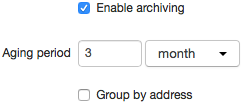
Selecting the Enable archiving check box in the Archiving settings section allows decreasing the database load similarly as the aggregation period. If it is selected all obsolete charge logs are archived and stored in the system in short form excluding details. A charge log is considered obsolete if the amount of time, elapsed after it was closed, exceeds the value set in Aging period. Aging period can be set in hours, days, months, and years.
Aging period is used only for price plans. Within a price plan, archiving is carried out only for services that also have the Enable archiving check box selected.
The Group by address check box defines if when archiving a charge log the data on a consumed service should be grouped by its providing addresses (phone numbers, IP addresses, etc.). The Group by address check box is used only for services, not for price plans.
The Effect of Service Parameters Within Price Plans
If values specified in a scheme for a service mismatch those set up for a price plan it belongs to, you should expect the following:
-
the Service type, Service providing type, Billing period (should be shorter or equal to the billing period of the price plan), Charging type (At period beginning or At period end), Permission to subscribe/unsubscribe, Charging when terminating/opening charge log parameter values remain unchanged and are applied regardless of the price plan settings.
-
the Service providing point value: for a one-off service the value as per the price plan is used, for a recurrent one — the value as per the service itself.
-
Charging period takes the value of the service billing period.
-
Reservation period and Rating method are not applied.
Aggregation period may be specified for a price plan or for a traffic service included into it. Price plan settings have a higher priority: a value for the service is used only in case no aggregation period is specified for the price plan.