Contract Terms and Commitments
In this section
See also
Contract Terms
To work with contract terms, you need the Add and change contract terms permission from Subjects → Other permissions.
For contracts (both a basic and a customer ones) you can set up contract terms for certain services. According to these terms, when subscribing to a service, a customer makes a contract commitment: he/she is to use a service for a defined period and pay for it in time. Hydra Billing uses the measures specified in the terms to secure fulfilling the commitment.
Contract terms are inherited according to the contract hierarchy: if a term is created in the basic contract, it applies to all customers whose contracts are created on the ground of the basic one.
A term added to a service contract applies only to a customer it is concluded with, i.e. it is individual. Individual terms have a higher priority. If a customer contract has a term for services containing a list of tags same as in a basic one, the commitment will be based on the customer contract terms.
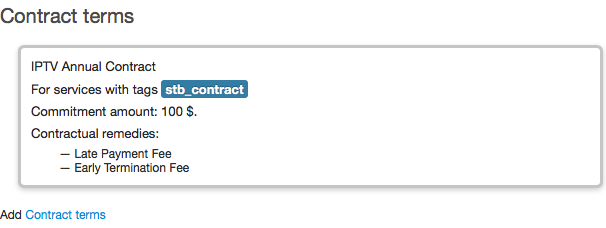
Add new contract terms or click an existing one to change it.
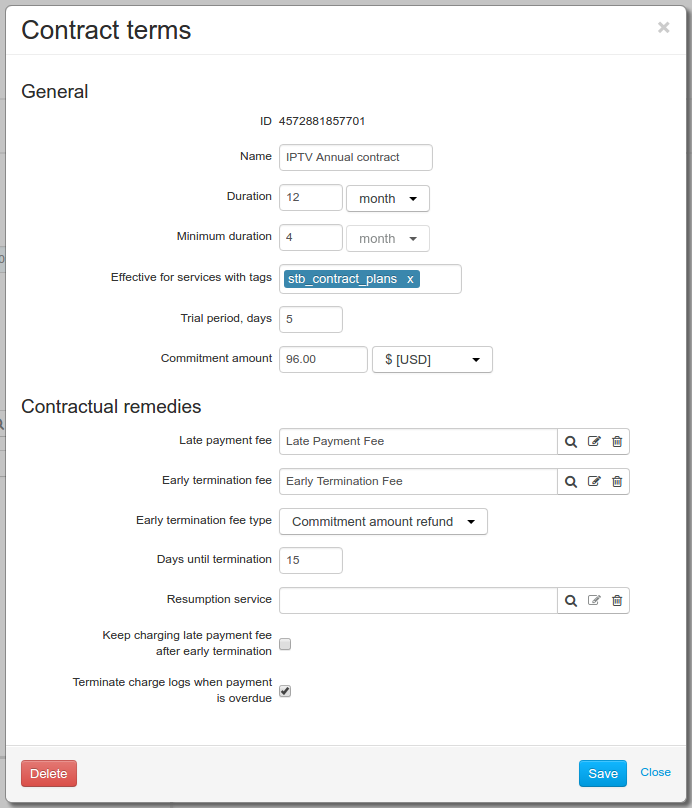
Contract terms, specified in the basic contract, can be changed. Updated terms will be applied only to new subscriptions. Already existing contract commitments remain unchanged.
Individual contract terms of customer contracts cannot be changed, if contract commitments have already been created on their basis.
General
-
Name is shown in the Contract commitments section of a customer contract, and when choosing available services in subscription.
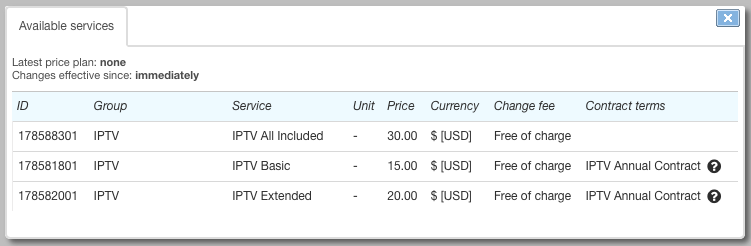
-
Duration determines the contract period. During this period a customer is to duly pay for the services and is not allowed to change the price plan. Also this parameter is used to decrease the commitment amount which is in proportion to the period of using the service.
Set the duration using the same units as for the billing period of the service.
-
Minimum duration is used when calculating an early termination fee of the Payment for minimum period type.
-
With the help of the Effective for services with tags lookup, select services the contract terms will apply for. Contract terms will apply only for subscriptions to services which have all selected tags.
It is impossible to set up several contract terms for one list of tags inside one contract.
If, according to your contract program, you offer a variety of contract terms (for example, a variety of duration periods — 12- and 24-month periods), then you should create separate product catalog entries for services with different lists of tags.
-
Trial period is set up in days. During this period, from the start date of the contract commitment, a customer may refuse fulfilling the contract, without paying an early termination fee. If the period is not defined, the fee is charged off regardless of the date the customer stops fulfilling the commitment.
-
Commitment amount is paid by a customer during the contract period together with the service subscription fee. Usually it equals the cost of CPE that the customer has received (a set-top box, an LTE router, a CAM module, etc.), but you also can specify a different sum, for example, the cost of organizing a communication channel to a customer. When the amount is paid back, the contract commitment is considered fulfilled.
The commitment amount should not equal zero.
Contractual remedies
-
In Late payment fee, select the product catalog entry from the Penalties section, which has Late payment fee in Penalty type. Late payment fees are charged in case of payment arrears. The fixed part of the fee is set in a price specification and is charged once. The interest rate and the charging period are defined in the product catalog.
If not filled in, there is no fee charged for late payments.
Fees are charged either for active commitments or for those awaiting payment. After a customer has fulfilled the commitment, fees accruals stop, even in case a customer fails to pay in time.
-
In Early termination fee, specify the product catalog entry from the Penalties section. Its parameters should be set up as Penalty type — Early termination fee. Hydra Billing will use it for charging off the early termination fee. The contract commitment can be terminated due to a customer's request. It is also terminated automatically if arrears remain unpaid over the period specified in Days until termination.
If the penalty is not specified, a customer does not pay an early termination fee.
When the contract commitment is terminated, the customer contract is not terminated, and the subscription for the price plan is still in force. The contract commitment can be resumed or fulfilled, if a customer pays the arrears including the early termination fee. In the latter case, a customer then continues using the same contract price plan (although without any contractual remedies), until he/she or you change the price plan for a different one.
-
Early termination fee type defines how Hydra Billing calculates the compensation in case of automatic termination of the contract commitment.
When the Commitment amount refund type is selected, the amount of the fee equals the commitment amount remainder at the time of the early termination. Apply this type to guarantee the repayment of either CPE or connection costs.
The Payment for minimum period type of compensation consists of two parts. The first part is the cost of the penalty service from Early termination fee which is set in a price specification. The second part refers to the value of the Minimum duration parameter: if a customer uses the service for a shorter period, he/she is to pay for the missing days/months. If the minimum period is not specified, a customer pays only the cost of the penalty service as the fee.
Let us suppose that the subscription fee for the contract price plan for Internet is $30, whereas the penalty service costs $16 according to the price specification. If the minimum duration is 4 months, but the commitment is terminated right after 2 months, the customer has to pay the fee of $76: $60 as the subscription fee for the 2 remaining months and $16 for the service. Whereas when the commitment is terminated early after using the service for half a year, the customer is to pay only $16, because the minimum period is over.
When terminating a commitment manually, you can choose the fee type. To do so, the contract terms should have all parameters defined for both Commitment amount refund and Payment for minimum period types.
-
In Days until termination, specify the allowed amount of days for the arrears to remain unpaid. If a customer is not able to repay the arrears during this period, the contract commitment is terminated, and the early termination fee is charged off. If you leave Days until termination empty, the commitment cannot be automatically terminated.
-
Resumption service. When a contract commitment is terminated, you can cancel the charging of the early termination fee upon the customer's request, and resume the contract commitment. This service may be billable. Set up the resumption service so Hydra Billing makes the one-off charging when the early termination fee is canceled.
-
By selecting Keep charging late payment fee after early termination you allow Hydra Billing to continue charging late payment fees even when the contract commitment is over, and has the Awaiting payment status.
If an early termination fee has been charged off, the late payment fee is charged not only for the service arrears, but also for the amount of the termination fee.
-
By selecting Terminate charge logs when payment is overdue you can influence the customer's ability to use the price plan in case the customer is late with payments. Providers usually prefer to stop providing services. If it is selected and a customer has overdue payments, then with the next start of the Monitoring overdue receivables task, the current charge log is to be terminated.
Contract Commitments
A contract commitment appears at the time of creating a subscription to a service for which a contract term is set up. The commitment is shown in the corresponding section of the contract (when a customer has no commitments, this section is hidden).
There is only one contract commitment for one customer contract. If in the course of the contract the commitment has already been fulfilled (or canceled), and you want to subscribe the customer to a price plan with new contract terms, you should create a new contract for him/her, or add an addendum or an annex to the existing contract. Then set up subscription via the new document.
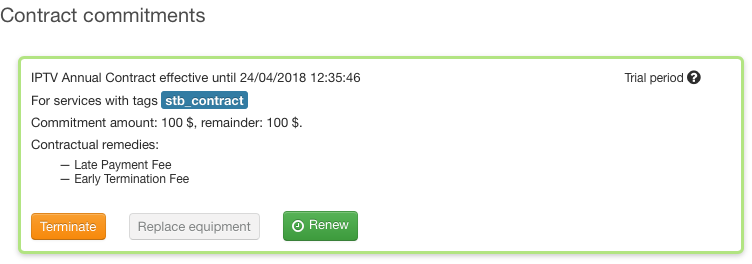
Check the date when the contract period is over and the remainder of the commitment amount the customer has to pay. Click the commitment to see the terms it is based on.
With commitments you can carry out certain actions.