Reports
See also
Hydra Billing allows creating reports containing both aggregated or detailed data on provided services and the movement of funds over any period structured by any category. Created reports can be exported to spreadsheets (MS Excel, OpenOffice Calc), or an CSV file for further processing.
Use the Reports menu to build reports.
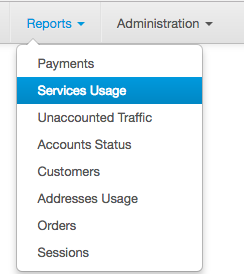
You can view reports on:
-
payments,
-
services usage,
-
unaccounted traffic,
-
accounts status,
-
customers,
-
addresses usage,
-
orders, or
-
sessions.
Click the necessary command on the Reports menu.
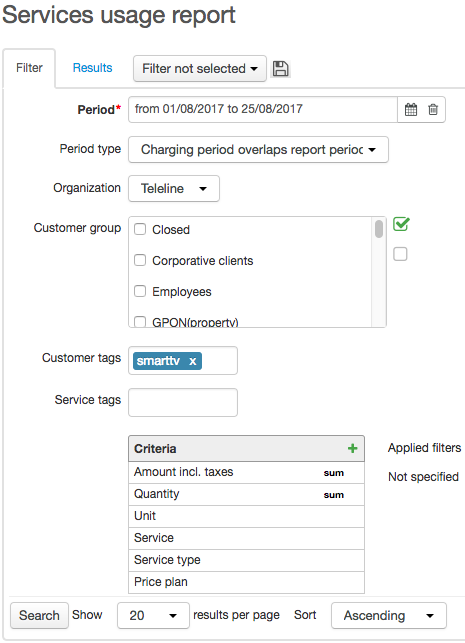
Enter the necessary period on the Filter tab.
The report building time depends on the period duration. If possible, try creating reports for shorter periods.
You can choose groups of customers, or specify tags applied to them. Depending on the report type, certain parameters can be available on the Filter tab, for example, tags for services or basic subjects, types of periods or payments, etc. Within certain report types, the Include archived data check box can be selected when it is necessary to consider the data which is archived with the help of the Archiving database tables task. You can save the frequently used filter settings similarly to the way you do it for registries.
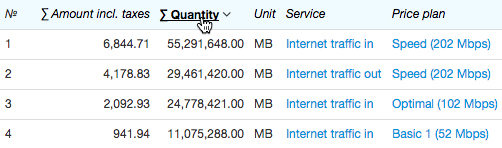
Click Search. The created report is shown on the Results tab. You can sort data by the necessary column by clicking its header.
To export results click  on the Results tab right upper corner.