Service Activation Rules
In this section
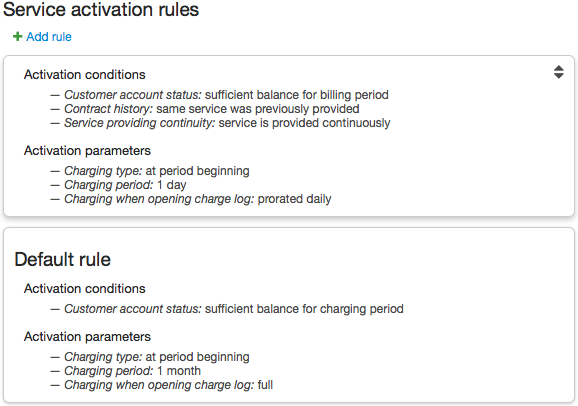
In service providing schemes, you can set up activation rules for services of the Regular, Temporary suspension, and Non-payment suspension types. Activation rules define which charging parameters are to be applied to services provided to customers when all specified conditions are fulfilled. For example, you can specify in an activation rule that if the previous charge log was closed due to lack of funds, then, in the following billing period, the charging period will equal one month, not one day, i.e. funds are charged from a customer account as a single payment for the whole month.
In a providing scheme, multiple activation rules can be set up. Rules are listed in the descending order of their priority. A Default rule is obligatory and has the smallest priority.
When issuing a charge log for a price plan or a service, Hydra Billing uses the first suitable rule. However, for services within price plans, a Default rule is always used regardless of any other rules that may be defined in providing schemes for such services.
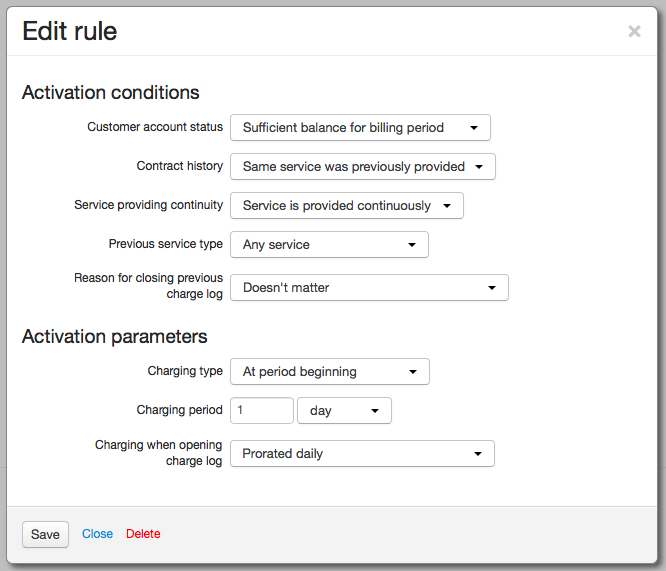
To add a new rule, click  Add rule. Specify Activation conditions and Activation parameters.
Activation Conditions
The following settings are available in the Activation conditions section:
-
Customer account status — defines if a service is provided only on the condition of available funds on a customer account (for the whole billing period or for a charging period), or regardless of an account status.
If you select Sufficient balance is not required for a price plan that contains access services it will lead to a situation when a charge log gets issued even with no funds available on a customer account, but all access services will be deactivated in this case.
-
Contract history — allows using various charging settings depending on whether any services have been provided in the course of a contract. If you select This service was previously provided the system will check for any charge logs for the same subscription. When choosing Another service was previously provided the system will check for any long-terms services provided in the course of the contract.
-
Service providing continuity — should be used if you select This service was previously provided in Contract history (otherwise, its value is considered as Service is provided continually). If the start date of a new charge log is one second greater than the end date of the previous one for the same subscription it means that the service is provided continually, otherwise it is considered as a break in providing.
-
Previous service type — allows changing charging parameters depending on whether a service of this type was provided to a customer in the previous billing period.
-
Reason for closing previous charge log — a parameter to consider a reason for closing the previous charge log for the same subscription.
Activation Parameters
When activation conditions are fulfilled, a service will be provided according to charging settings specified in the Activation parameters section:
-
Charging type — defines when to charge for a service, and is used only for services with time-based billing periods. Funds are charged at the end or at the beginning of a charging period. For example, when providing a service with a 30-day billing period and selecting charging at the end of a 10-day period, you actually set to charge funds on the 10th, 20th, and 30th days.
Charging at the period end means that a customer is allowed to have a debit (a negative account balance). If funds are charged at the beginning of a period, a debit may arise only in case a credit limit is granted to a customer.
-
Charging period — defines the way funds are charged for a service: as a lump sum if the charging period is the same the billing one, or in installments, if the charging period is shorter than the billing one. If the billing period for a service equals one month then the charging period may equal one day or one month.
-
Charging when opening charge log — defines the way funds are charged from a customer account in case a billing date is fixed and a charge log is issued in the middle of the billing period. If you choose Full the customer is to pay for the whole billing period regardless of the date when a service was activated.
If you choose Prorated hourly/daily funds are charged for a number of days (hours) elapsed after the service activation rounded up.