Editing a Charge Log
In this section
When charge logs have such statuses as In force, Executed, Canceled, they are locked. It means, that the contents and most of the boxes cannot be changed. Changes can be made (even in locked charge logs) only to Status and Remark.
When necessary, a charge log can be unlocked: to do it, ask Hydra Billing Solutions Inc. technical support for the unblocking code.
Editing a charge log may lead to changes of a customer's account balance, which then may cause severe consequences. For example, in case of canceling an executed charge log, all previously charged funds are transferred back to the customer account. And if the customer already had an exceeded credit limit, and canceling brings available funds back to the account, then a new charge log is issued automatically. So, according to a subscription, the customer starts to be provided new services, and funds are again charged to his or her account.
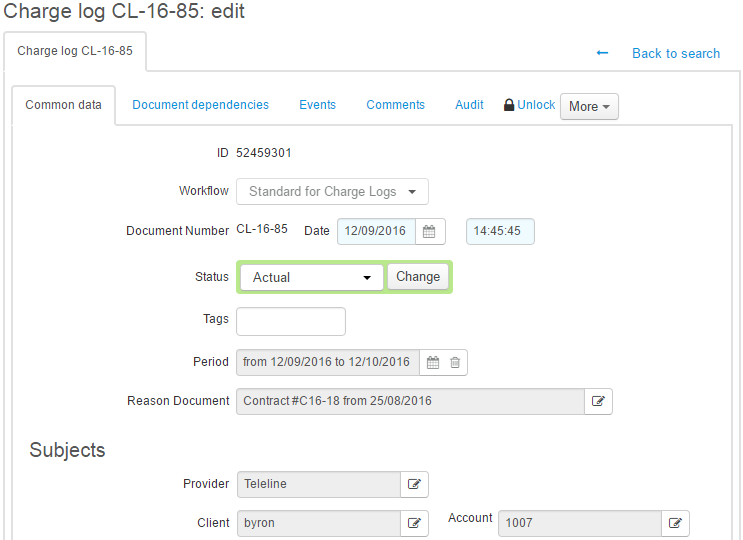
Similarly as in other documents, charge logs contain Workflow, Document number, Date, and Period.
A charge log can have one of the following statuses:
-
Prepared. Charge logs with this status are created by the Preparing charge logs for recurrent services task on the ground of subscriptions to recurrent services. They are made as prepared documents (typically, a few hours before a start of a new billing period) that contain information on charges in the next billing period. Prepared charge logs are then put in force by the Closing and putting in force charge logs task, when a charge log for a previous period is closed, and the period of the prepared charge log starts.
-
In force. This status is the main one for a charge log in the current billing period.
-
Executed. If a charge log has this status, it means that all services specified in it have already been fully provided to a customer, and all reserved funds are charged. Usually, charge logs are transferred into Executed ones by the Closing and putting in force charge logs task, when their periods are over. Changing a charge log status to Executed is called closing a charge log.
A charge log also becomes Executed in case of early closing, i.e. when changing its period to a shorter one (you can do in on the customer's Services tab).
-
Canceled. Canceling a charge log is equal to deleting it, so if there have been charges based on this charge log, at the moment of canceling all charged funds return back to a customer account.
If by any reason a faulty charge log has been issued for a customer (for example, based on a wrong price specification), then it can be canceled, and a new one can be issued manually. However when canceling a charge log you should note that information on consumed services (except for those a customer has a subscription to) will not be transferred into a new charge log, and charged funds will be returned to the customer account.
-
Being processed. It is used when rerating previously provided services. All rows of a charge log, that is transferred into Being processed, are deleted if they refer to traffic services. After that, it is possible to have the second loading and rating services which have been provided over the charge log period. When the processing is finished, you need to transfer the charge log into the Executed status.
In Reason document you can see a service contract on which ground the charge log has been created.
Closing reason is shown only in executed charge logs, with possible values:
-
Insufficient account balance — a charge log is closed early due to the lack of funds for the further charge.
-
Closed manually by operator — a charge log is closed early via the Service Provider Console (for example, when changing a price plan, or terminating a contract).
-
Closed manually by customer — a charge log is closed early by a customer via the Customer Self-Care Portal (for example, when changing a price plan immediately).
-
Sufficient balance for billing period — a charge log is closed early as there are enough funds on a customer account to pay for the whole billing period of a service.
-
Automatically (expired) — a charge log is closed by the scheduled task in normal mode at the end of its period.
For charge logs with the Canceled status, Cancellation reason is shown. It may be empty, or shown as Insufficient balance for first charge in case a prepared charge log was canceled while attempting to put it in force due to insufficient balance of a customer account for the first charge.
As Provider, the service provider is specified, and the customer is specified as Client.
Charge Log Summary
Open a charge log to view the summary on provided services.
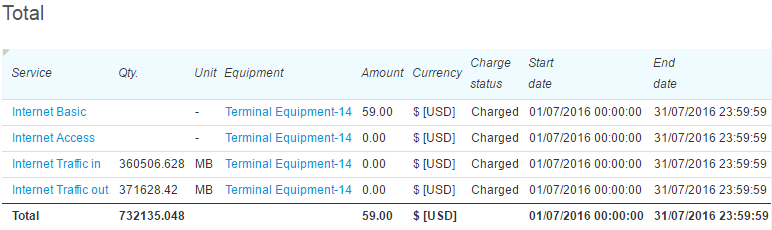
Information in the table is grouped by services, prices (for example, there are two separate rows in case there is free Internet traffic and paid traffic over the specified quota), and charging statuses.
Charge Log Contents
Editing the contents of a charge log is allowed only upon a consultation with Hydra Billing Solutions Inc. technical support specialists.
The contents of a charge log have a two-level structure similar to one of a price specification. Each row refers to a specification it is based on. If a row with a price for a product, a service or a price plan, is the main row in the specification, then a row in a charge log corresponding to it is the main too. Similarly, services included into a price plan in a specification are described in child rows in a charge log.
The number of rows in a charge log contents for a basic service (a price plan) depend on the charge log duration and the settings of a service providing scheme: each row corresponds to one charging period.
Rows that contain information on provided traffic services are created in a charge log over the billing period at the times of rating corresponding services, for example, with the next period of Internet traffic aggregation (for each aggregation period, there is a separate row created in a charge log), or when the system receives data on a phone call (each phone call is also logged as a separate row into a charge log).
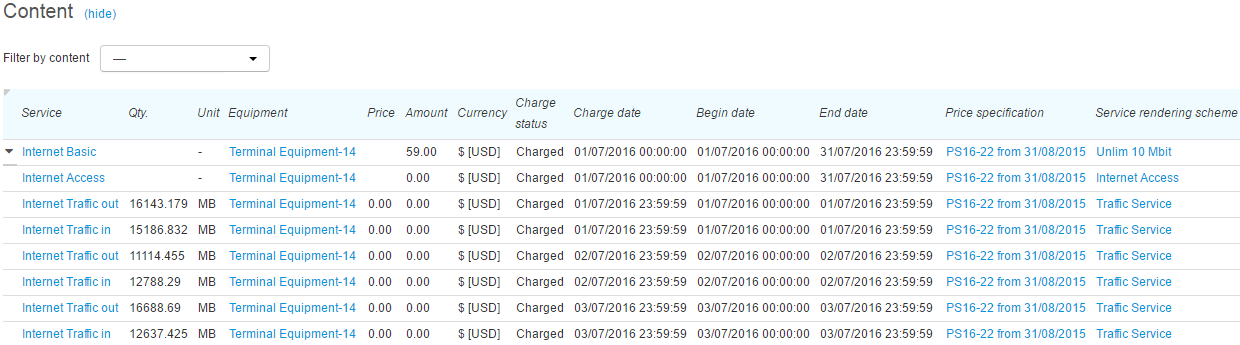
Using Show rows for you can see only rows containing certain services.
The table with charge log contents shows the following:
-
Product/Service — a product supplied to a customer, or a service provided to a customer.
-
Quantity — the quantity of the product or the service, calculated in the units specified next to it.
-
Unit — it should correspond to the units as per the price specification.
-
Basic quantity — the quantity of the product or the service calculated in units as entered into the system, for example, typically, bytes for measuring Internet traffic while rating it in Mb, and seconds for measuring phone services while rating them in minutes.
-
Basic unit — the unit used for measuring the basic quantity of products or services.
-
Equipment — equipment that belongs to the customer and used for providing the service.
-
Address — the address of the equipment the service is provided at. For example, an IP address is specified here for Internet traffic service, or a telephone number — for phone services. It may be unfilled as well.
-
Tax rate — the tax rate at which the following is calculated: an amount of taxes, and amounts inclusive and exclusive of taxes.
-
Price — the price of the product or the service according to the price specification.
-
Price excl. taxes — a price exclusive of taxes.
-
Amount — the total cost of the service provided to the customer or the product sold to the customer.
-
Taxes — all taxes included into the total cost of a service.
-
Amount excl. taxes — the total amount exclusive of taxes.
-
Amount excl. discount — the total amount without a discount.
-
Amount excl. discount and taxes — the total amount without a discount and exclusive of taxes.
-
Currency — the used currency.
-
Discount — the link to the discount certificate in case the discount has been applied.
-
Charging status — the Reserved status means that the customer account is to be charged a corresponding amount on the charging date. Charge log rows with this status are used to calculate the current reserved amount, which is shown in customer account parameters. The Charged status means that the amount have already been charged to the customer account. The Canceled status means that the service has not been provided to the customer. In case the amount has already been charged, at the time of canceling all charged funds are returned to the customer.
-
Charging date — the date and time when the amount stated in the row is to be or was charged to the customer account.
-
Start date — the start date of the charging period.
-
End date — the end date of the charging period.
-
Remark — a comment to the row.
-
Price specification — a link to a price specification the row is based on.
-
Service providing scheme — the link to the corresponding scheme.
Charge Log Archiving
If archiving is enabled in a service providing scheme of a basic service (price plan), and the elapsed time since the end of a charge log is greater than a period entered in Aging period, the charge log is archived by the Charge log archiving task and marked with  Archived.
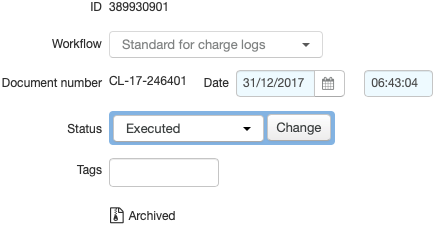
Archived charge logs are left out when creating invoices. A too short Aging period may result in archiving a charge log even before invoices are generated. Thus services from this charge log will not be included into an invoice.
When archiving, lines of a charge log are grouped by calendar month. For example, if a charge log period is from September 15 to October 15, and it contains daily charges for a price plan, then after archiving there will be only two lines in the charge log: the first one with the charged amount for the period from September 15 to September 30, and the second one — from October 1 to October 15.
Charges for services within the price plan are grouped if archiving is enabled in their service proving schemes. Grouping is also done by month and, if the Group by address check box is selected, by equipment addresses. Aging period entered in a service providing scheme of a child service is ignored.