Reports on Unaccounted Traffic
Reports on unaccounted traffic are used mostly by system administrators and technicians that are responsible for Hydra Billing and equipment maintenance. Such reports are used for:
-
detecting unauthorized and suspicious connections to the provider's network,
-
detecting errors in Hydra Billing and network equipment configuration, or
-
controlling traffic flows and traffic classes within the network.
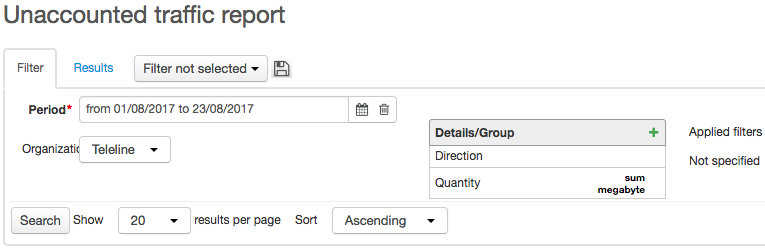
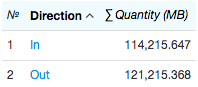
You should add the Quantity (apply the SUM function to it, and choose MB in Unit) and Direction criteria to your report. Enter the report period and click Search. On the Results tab, view the created report containing the total outbound and inbound traffic quantity, that has not been rated for some reason.
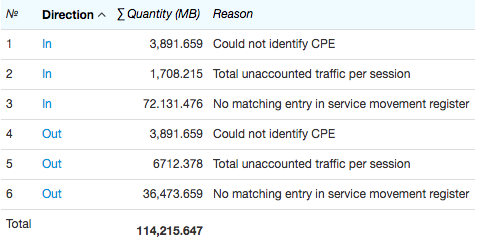
In order to determine why the traffic has not been rated, add to your table the Reason criterion, which may be stated as:
-
Could not identify CPE — no CPE registered in the system has the IP address specified in the session.
-
Ambiguous IP address mapping — several pieces of CPE have the IP address specified in the session.
-
Nonexistent traffic service — the session does not correspond with any of the determined traffic classes and cannot be matched with any traffic service.
-
No matching entry in service movement register — the rating has not been carried out due to a number of reasons, including: no charge log was issued for a customer; the statistics aggregation date did not fall within the current charge log period; a customer was not subscribed to a service; no price specification existed for a service, or it had expired; no price was specified for the service in the price specification, etc.
-
Session end date is less than its start date.
-
Session end date is greater than current date.
-
Total unaccounted traffic per session — unaccounted traffic falls into this category if at a synchronization session with the traffic collector its quantity has not exceeded the quota specified in the division settings. For example, if at a synchronization session total quantity of unaccounted traffic has not exceeded 2 MB, then it is related to the total unaccounted traffic without defining any reason why the rating was not performed.
If you add the Status criterion, then the report is created with the status of synchronization with traffic collector:
-
Synchronization started — is used in the very beginning of a synchronization, before connecting to a collector.
-
Statistics received — data on provided services has been received from the collector.
-
Statistics processed — the data format has been verified, the data has been processed and is ready for rating.
-
Synchronization completed — statistics has been rated.
-
Statistics retransfer required — is not used in the current version of the software.
When necessary, by adding corresponding criteria you can view start and end synchronization dates in a report (they are determined as minimum and maximum dates of statistics rows per synchronization session), participants' addresses, and other useful data.
For example, to search for sessions that has not been rated due to the absence of equipment, and the traffic quantity has been bigger than 1 MB, you should set up criteria as follows (the quantity limit is entered in bytes):
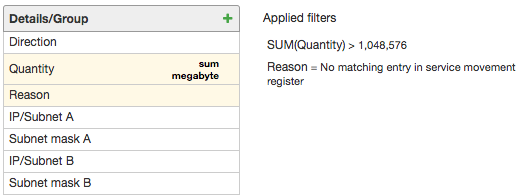
The report is created as:
