Applying Functions and Filters
Aggregate functions and filters can be applied separately or together. Let us see examples when various combinations of criteria settings are applied to a simple payments report containing the Customer, Amount incl. taxes, and Operation date criteria. By default, all the criteria have the Display check box selected.
Using a Criterion Without Functions or Filters
If there is no aggregate function or no filter used for a criterion, and the Display check box is selected, then the criterion values are shown in a separate column of the report. On the other hand, clearing the Display check box means removing a criterion from the report, i.e. its values are not used in the report and have no influence on the results table.
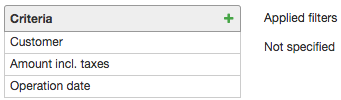
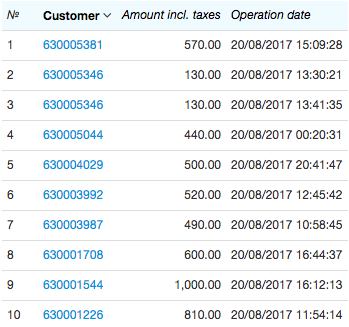
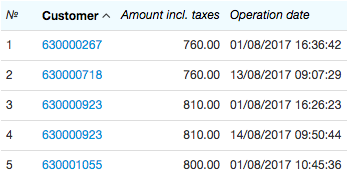
In our case, when all criteria have the Display check box selected, then the report is built with the list of customers and their dates and amounts of transfers, made over the report period.
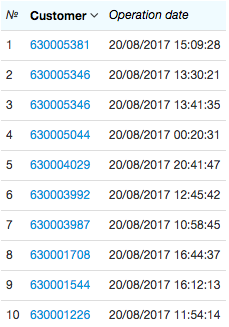
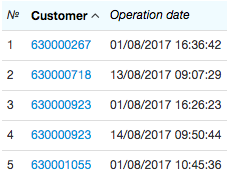
After clearing the Display check box in the Amount incl. taxes criterion settings, the report contains only the columns with customers and operation dates.
If, instead of clearing the Display check box in the Amount incl. taxes criterion settings, you decide to clear the Display check box in the Operation date criterion, the report is built only with such criteria as Customer and Amount incl. taxes, without considering the values of the Operation date criterion.
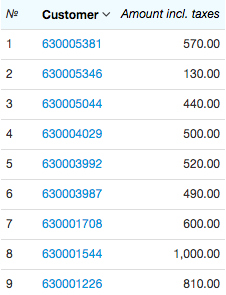
Note that the customer 630005346 had made, according to the previous reports, two payments in the amount of $130, however the new report contains only one record for him — as his payments are grouped in one row. They are grouped because the values of the Customer and Amount incl. taxes criteria coincide. (To define the amount of such payments, you need to apply the aggregate function, see below).
Applying a Filter
If there is a filter applied to a criterion, without using an aggregate function, and the Display check box is selected, then the report is built containing only the rows with criterion values complying with the filter conditions. When the check box is cleared, the column with the criterion values is not shown in the report, but the filter conditions are still applied to build the results table.
Let us create a filter for the Amount incl. taxes criterion: with it, we are going to search for customers that have made payments for more than $600.
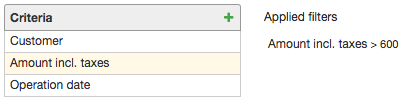
Let us clear the Display check box in the Amount incl. taxes criterion. Now there is no column with amounts in the report, and only customers whose amounts comply with the applied filter are shown together with their operation dates.
Let us clear the Display check box in the Amount incl. taxes criterion. Now there is no column with amounts in the report, and only customers whose amounts comply with the applied filter are shown together with their operation dates.
Applying an Aggregate Function
When you apply the aggregate function and select the Display check box, the corresponding values of the function are shown in the report. When you clear it, the corresponding column disappears.
In the example below, we use the abovementioned criteria and apply the Sum function to the Amount incl. taxes criterion.
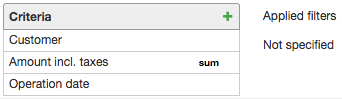
The created report does not differ from the one which was built without using the aggregate function. It happens because the payments are summed by both customers and operation dates, which are different for all payments.
If we clear the Display check box in the Operation date criterion (in this case, the Operation date criterion has no effect on the report results), the report is built as follows.
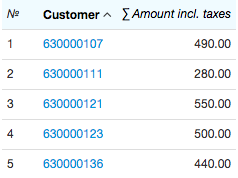
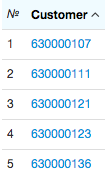
Each row shows the amount of payments made by a customer over the report period. If you clear the Display check box in the Amount incl. taxes criterion, the report is built with only one column showing the list of customers that have made payments.
Applying Both Functions and Filters
In case a criterion have both an aggregate function and a filter applied to it, the aggregate function value is to comply with the filter conditions.
Let us search for customers whose total amounts of payments exceeded $1200. To do so, clear the Display check box in the Operation date criterion, so that payments are summed only by customers (or you can delete this criterion from the report). Now we apply the Sum function and an additional condition to the Amount incl. taxes criterion.
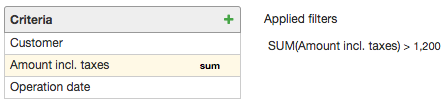
The result table looks as follows:
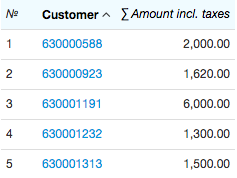
If you clear the Display check box in the Amount incl. taxes criterion, the report shows the same customers (i.e. the applied filter still has the effect), but the amount of their payments is not shown.