Editing Equipment Components
Equipment components are created on the basis of a specification. You can add and view components on the Components tab. CPE components can be also viewed on the corresponding customer's page.
When adding equipment on the customer's page there is a new component created for it and numbered with the help of autonumbering.
You can also open the component's page from the Bindings tab on the corresponding object's page.
On the component's page you can view the same tabs as on the equipment's page, except for the Components tab.
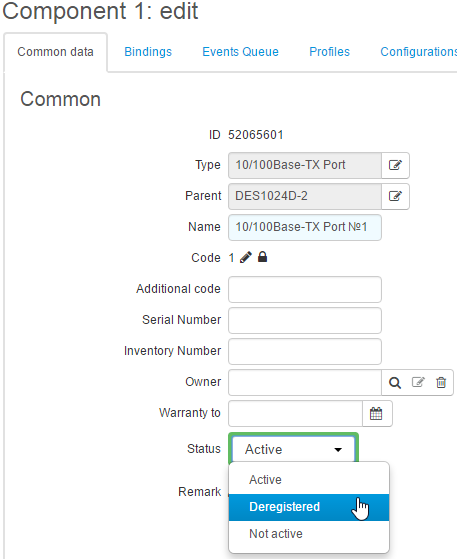
In Parent, you can view the code of equipment the component belongs to. Parent, just as Type, cannot be changed.
Additional code, Serial number, Inventory number, and Warranty expires are usually not entered for components.
The Custom fields section contains parameters set up for the type of the specification item the component is based on.
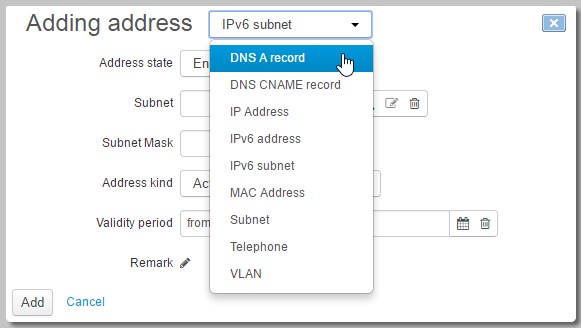
In the Addresses section, in contrast to the equipment itself, you can add different network addresses for components. To add an address, you need to choose its type.
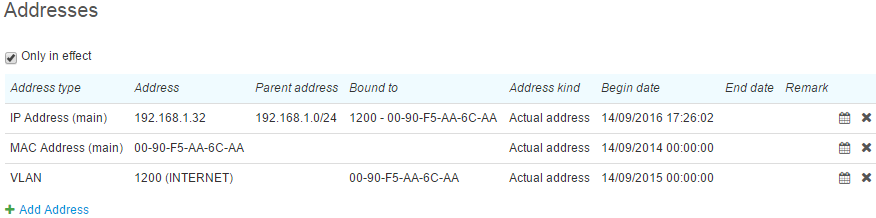
See below an example of entered addresses, such as a MAC address, a VLAN, and an IP address. The IP address is bound to the VLAN, the VLAN, in its turn, is bound to the MAC address (the Bound to column). In Parent address you can see the subnet that contains the IP address.
To delete a component, click Delete on its page.
Deleting an active component with its bindings may lead to failures in providing services to a customer.