Specifications
Specification defines possible components of an object (an equipment or a network service). It contain types of components that the object can have and components' quantity. You can configure a specification for entries from the Material assets and Network services sections.
When working with a specification, use types of specification items that either belong to the catalog group of an entry you are customizing a specification for, or one of its parent groups.
In the example below, see a specification for the D-Link DES-3028 entry which is created on the basis of the Port and Control port specification item types from the Active equipment group.
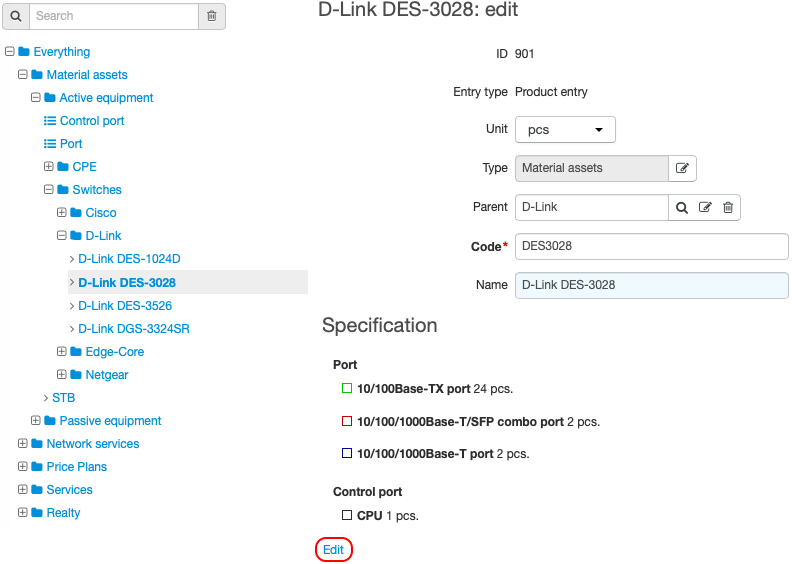
Click the product catalog entry. Then click Edit in the Specification section.
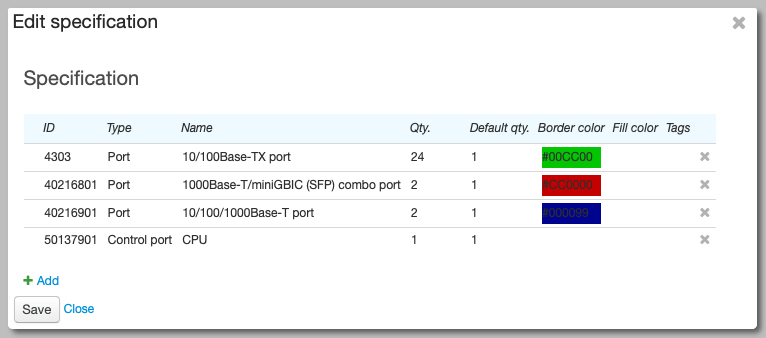
To add a new item, click  Add. Enter item parameters in a new line:
-
Type — select one of the available specification item types.
-
Name — type the name of the specification item (i.e. a name of a component type).
-
Qty. — enter a number of components of this type that an object can have (if not specified, the number is unlimited).
-
Default qty. — enter a number of components of this type that will be created automatically when creating customer equipment.
-
Border color, Fill color — enter colors that define component's appearance on the Components tab of an equipment or network service.
-
Tags — set any available tags. If the item has tags that are entered in a provider profile template, then profiles are generated for all components of this type.
To edit an existing item, select it.
To save all changes, click Save.