Tags
In this section
Using Tags
Tags are used for a thorough marking of all entities in Hydra Billing. Tags are not typed: the same tags can be used for marking subjects, documents and catalog entries. So with tags you can bind entities of different types. Use tags, for example, for granting discounts.
There are Tags lookups on the pages of subjects, documents and catalog entries.
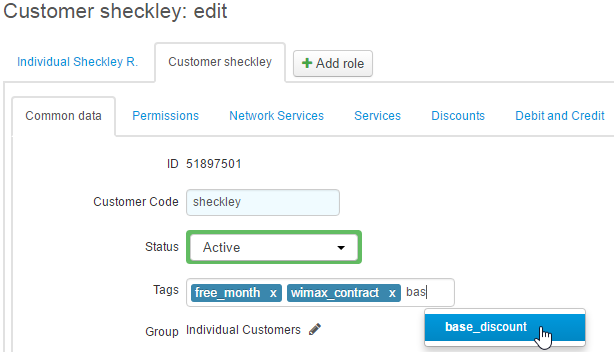
Use tags, not groups, when marking particular customers or dividing them into categories.
Setting tags is regulated through permissions. This has to do with the fact that grouping entities via tags is used for different purposes and when uncontrolled may lead to violations. For example, when segmenting customers for granting discounts.
You can set only such tags that are permitted to be used. Permitting particular tags can be done on the Permissions tab. Users with the System administrator permission can set and remove any tags.
Searching with Tags
When searching subject registries and document registries, you can filter by tags. The search results will show entities with all selected tags.
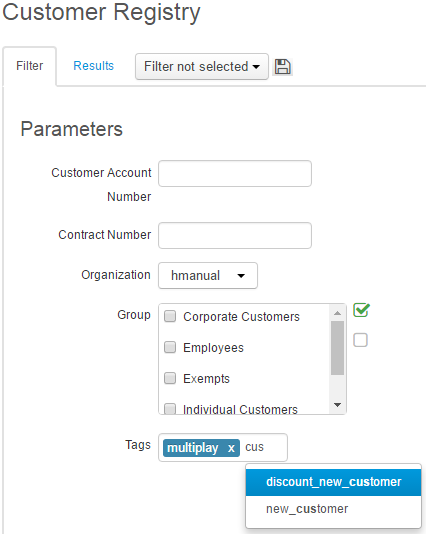
Quick search results can be filtered by tags using a # modifier.

Modifiers can be used for the additional filtering of search results. Quick search is not used for displaying all entities with the set of tags.
Tags Registry
Tags cannot be created on the fly. The tags registry is usually filled by the administrator who has the permission to edit it. Lookups offer only the tags from the registry.
Open the tags registry from the menu Registry → Tags.
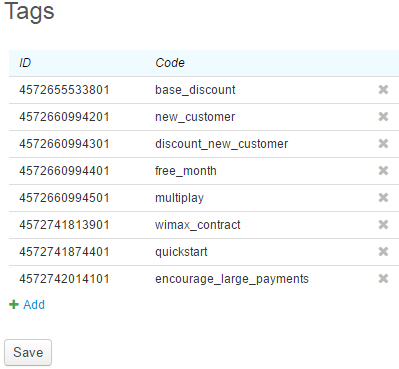
Create a new tag by clicking Add.
A tag name consists of letters and numbers in the low register. When saving, the system transforms any entered values into this format, changing spaces into underscore.