Product Catalog
In this section
See also
The product catalog is one of the basic registries in Hydra Billing. Use Master Data → Product Catalog to open it. The catalog contains all services and price plans provided to customers, as well as types of equipment and other entries required for the system operation.
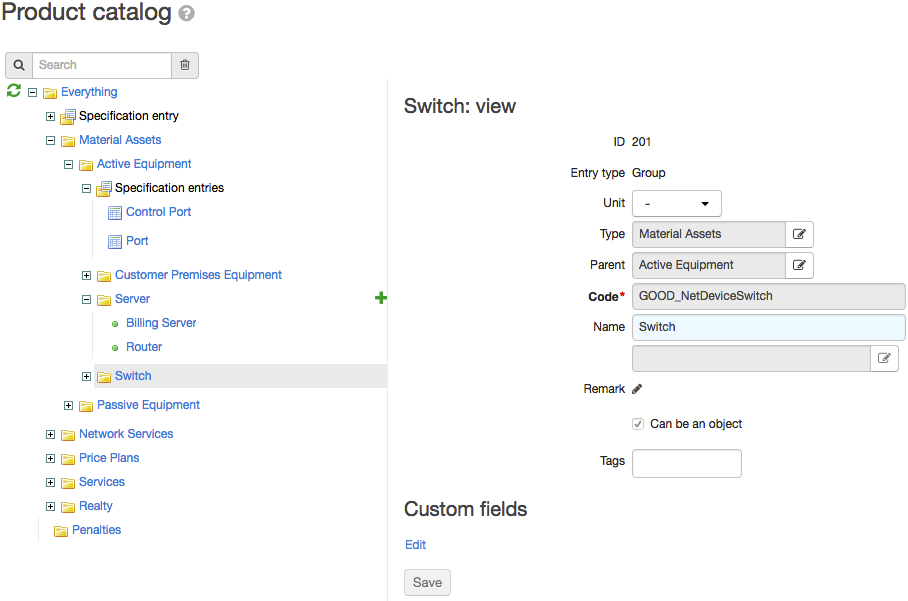
The catalog tree includes seven sections:
-
Material assets — catalog entries related to the inventory, including entries for active and passive network equipment.
-
Network services — a set of entries describing various network services which Hydra Billing is integrated with (DHCP, DNS, email, IPTV Middleware, VPN, and so on).
-
Price plans — contains price plans.
The Price plans section contains only a list of all price plans without specifiying which services they contain. Contents of price plans are determined in price specifications. The same price plan can contain different services while in different price specifications.
-
Services — a catalog of services which can be provided both independently or as a part of a price plan.
Do not place entries for price plans in the Services section. If you do so, you will not be able to add child services to such plans in price specifications.
-
Realty — entries on the basis of which real estate objects are created to store parameters of regions of the Building type.
-
Penalties — entries used for charging late payment fees and early termination fees when using contract plans.
-
Adjustments — entries used when adjusting account balances.
Inside sections, catalog entries can be combined into groups. To expand or collapse a group or a section, click or next to it.
Choose an entry or group to view its parameters.lf
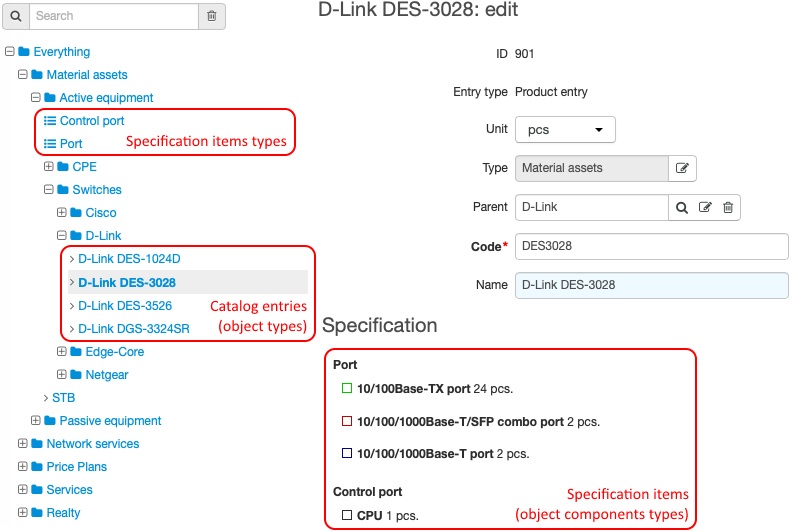
The Network services and Material assets sections additionally contain types of specification items. They are marked with . These types are used to describe object components, i.e. to configure specifications. A type can be used in a specification of any entry located in the same group of the product catalog as the type itself.
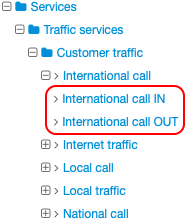
Entries from the Traffic services group (in the Services section) have two sub-entries — detailed services. They are used for rating traffic or calls depending on the direction (inbound or outbound). Detailed services are created automatically when adding an entry to the Traffic services group.