Editing a Discount Specification
Open a discount specification to change its status, parameters and contents.
Check the heading to see the category of customers the discounts are available to. Segment the customer base with tags: in the discount specification heading enter a set of tags a customer is to have in order to be granted discounts. Discounts can be granted only to customers who have all the tags from the set.
If a discount specification does not contain any tags, then discounts can be granted to all customers whose providing company is entered in Provider.
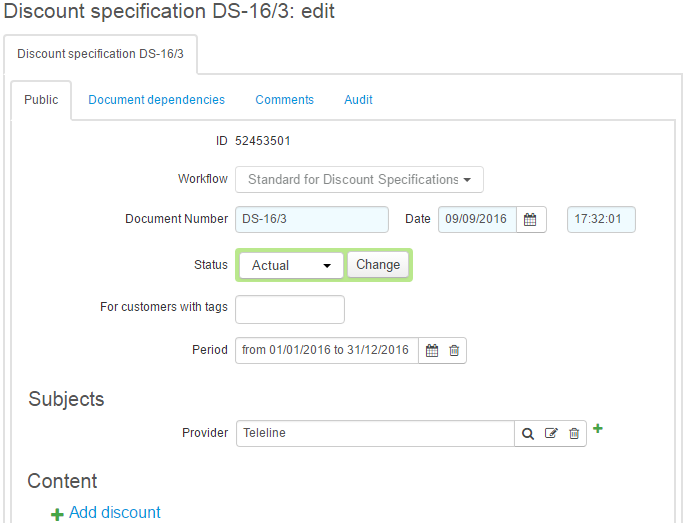
Customers can be granted discounts only during the period the discount specification is in force.
Granting a discount means there is a document of the discount certificate type issued for a customer. It is automatically issued by the system when all conditions for granting a discount are met.
When the period of the discount specification is over, new discount certificates cannot be issued, but the already issued ones are still in force.
A Discount Specification Contents
Each record in the specification contents describes the conditions for granting the particular discount, and its operation parameters.
Click Add discount.
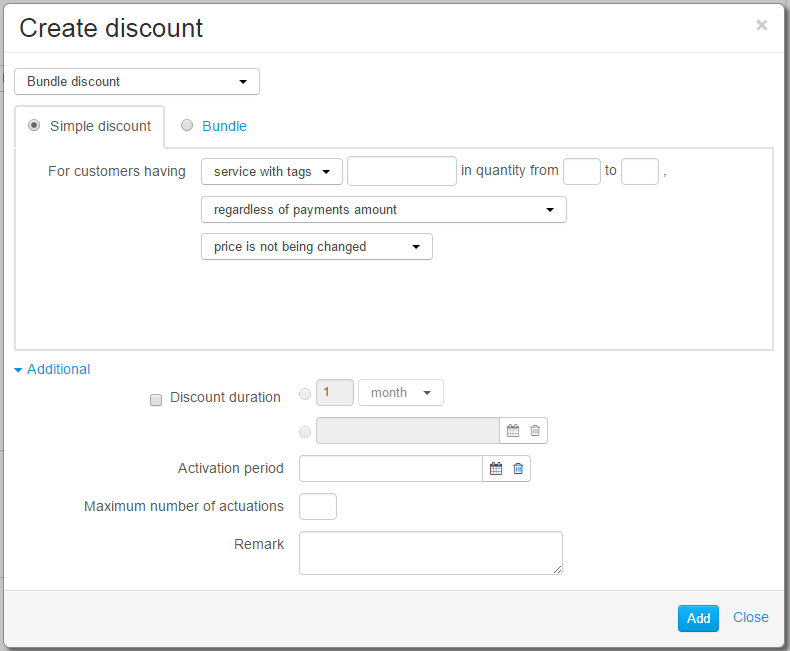
You can define the conditions the customer has to meet in order to be granted the discount, as well as the operation parameters of this discount.
Choose a discount, the conditions for which you want to describe. The list of discounts is stored in the Discounts reference data.
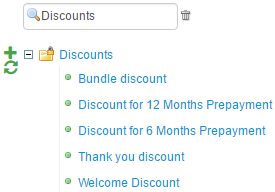
A discounts determined in a specification which is in force for the customers with certain tags cannot be used in another specification for the same customers.
Choose the discount type. Discounts can be simple and bundle ones.
-
To get a simple discount, a customer should be subscribed to the chosen service, or a service with the specified set of tags. If granting a discount depends on a payment, it is also necessary to make a payment in the required amount.
-
Bundle discounts (bundles) are granted when a customer is subscribed to several services at the same time. Each of the services has certain discount parameters. For bundle discounts, it is impossible to specify the condition for the payment amount.
Choose services that are to be subject to a discount. It may be a certain service from the product catalog, or all services with a certain set of tags.
Specify the number of subscriptions for appropriate services a customer is to have in order to get a discount. If the discount is applicable to all suitable subscriptions, type from 1. It is applied by default.
If a discount is granted regardless of any payments, choose Regardless of payments. When creating or editing subscriptions,Hydra Billing checks whether the discount conditions are met. If subscriptions comply with a discount description, a customer gets a discount certificate.
If a discount can be granted because of the payment amount, a customer is not only to comply with the service subscriptions requirements, but also is to make a payment in the required amount. The amount of every payment is checked separately. You can specify the condition for the payment amount in two ways:
-
enter the minimum or the maximum amount (the maximum one is not necessary), or
-
enter a period the payment amount should cover. When a payment is received, Hydra defines the cost of services under suitable subscriptions over the specified period. The discount is granted in case both the payment amount and the amount of available funds after the account balance is topped up are equal or greater than the cost of the services.
Specify the way the discount is applied.
-
The price is replaced — in this case you can enter the new price instead of the one as per the price specification.
-
The percentage discount is applied — the cost of services is decreased by the specified percentage.
-
The price does not change — the price and the cost of a service remain the same. This option is used for bundle discounts when it is necessary to check if a customer has a subscription to a certain service, but the cost of services under this subscription is to remain unchanged. For example, free television comes together with the Internet connection: in this case, the price for TV service is $0 and the price for Internet service does not change.
Additional Parameters of Discounts
-
Discount period determines the period of the discount certificate. It may be unspecified, so it is in force as long as the subscription to service is. If you need to restrict the discount period, you can do it in two ways: specify the duration of discount period (2 months, 1 year), or the start and the end dates (from December 01, 2016, to December 31, 2016).
The discount period of 1 month does not imply that a customer is to receive services at the discounted price for a period of one month. It means that the discount certificate is valid during this period The discount is applied to all charge logs for the specified subscription, if they start within the period the certificate is in force. For example, if the charge log with a one month duration is terminated earlier, and the next charge log is to be issued during the same month, the discount is applied to both charge logs.
-
Activation period — here you specify the period the discount can be granted when necessary conditions are met.
-
Maximum number of actuations shows the number of times the discount certificate can be issued for the discount in terms of one customer account.
-
Comment — here a comment can be typed. The comment is shown in the list of discounts in the discount specification.