How to Change Service Providing Parameters
See also
Service providing parameters can be changed in service providing schemes, but Hydra Billing prohibits changing most of scheme settings after a charge log has been issued according to the scheme. Even without charge logs, some parameters (for example, Service type or Service providing point) cannot be changed, if customers have already subscribed to services with the given scheme.
If you need to change parameters of a currently provided service, or to correct the preset scheme, do it in the following three steps.
Step 1. Copy the Service Providing Scheme
Open the service providing scheme you want to change and click Copy.
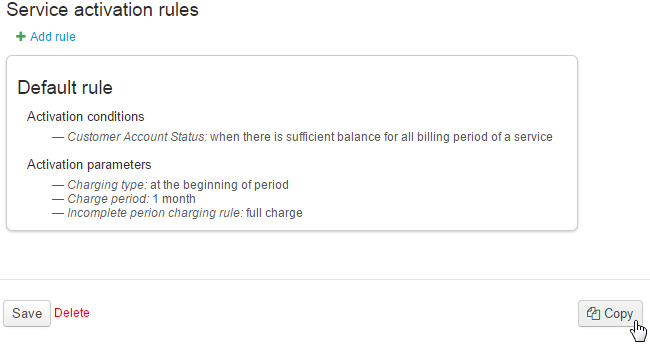
Hydra Billing copies the chosen scheme, then automatically redirects you to the copied one.
Step 2. Customize the New Service Providing Scheme
Make necessary changes to the new service providing scheme.
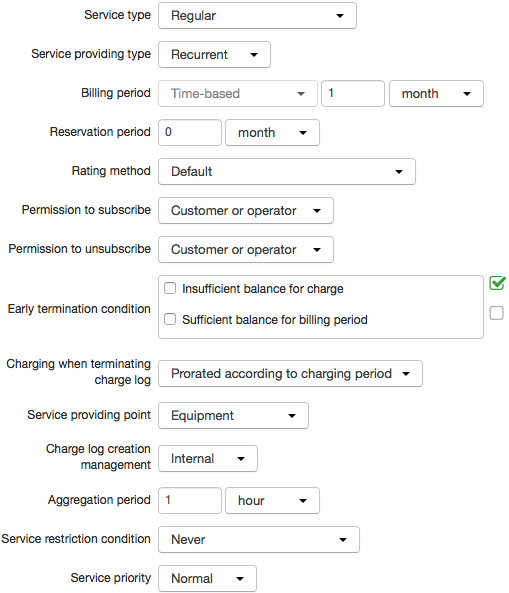
Step 3. Enter the Service Providing Scheme in the Product Catalog
Choose the new providing scheme for the service.

The new scheme will be applied when the new charge logs for the service are issued. Services included into already issued charge logs will continue to be provided according to the old scheme, which was in force at the time of issuing the charge log.
It is not possible to change the service providing parameters within the current charge logs. If you need to apply new settings immediately, you have to manually terminate charge logs for services with the chosen scheme. Issue new charge logs manually, or wait till they are issued automatically by the scheduled task. Services will begin to be provided according to the new scheme.
Be careful with these actions, as they may cause a break in providing of services to customers.