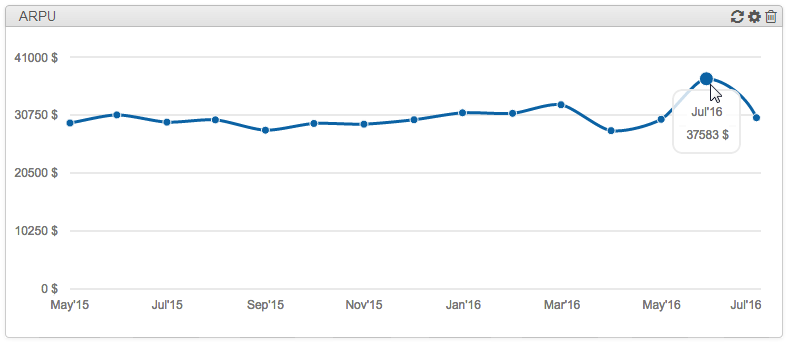
Widgets
In this section
To add, edit and view widgets you need the appropriate permission.
On the Service Provider Console main page, you can add and configure widgets that allow you to monitor the company's monthly performance: Active customers, Penetration, Revenues and ARPU. Their values are calculated by the Calculating business indicators task.
Another type of widget — Reminders — shows reminders from the Comments tabs of entities.
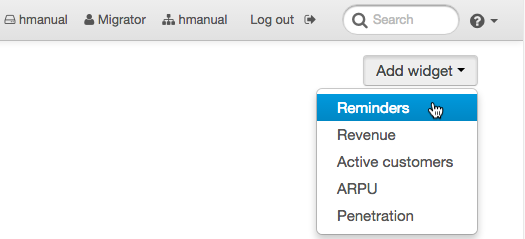
To add a widget, click Add widget and select the one you want from the list.
With  , you can open the widget’s settings, where the name of the widget, the number of months the widget information is given for, the company, and the amount that one unit represents for penetration and ARPU are specified (Divisor).
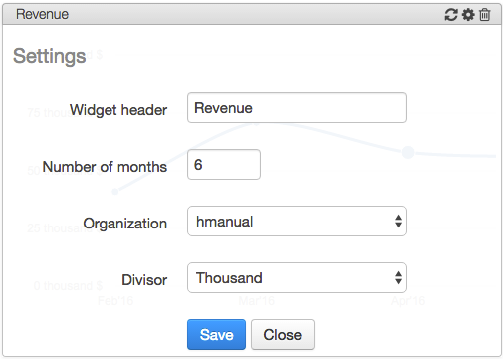
Make sure that the value specified in the Number of months is not greater than Period for indicators calculation in the task settings. Otherwise, widgets may show incorrect values.
To delete a widget, click  .
.  is used to update the widget indicators to the current calculated values.
Widget data, except for penetration, is given graphically, with values per month. To view the value at any point, simply move the cursor to it.