How Auto Top-up Works
Subscribing to Auto Top-up
One of the autopayment creation rules should apply to a customer: he or she is to belong to the division given in the rule and to have necessary tags and an account in the specified currency. Then he or she can subscribe to auto top-up in the Customer Self-Care Portal by clicking Enable auto top-up. If no rule suits, no link is shown.
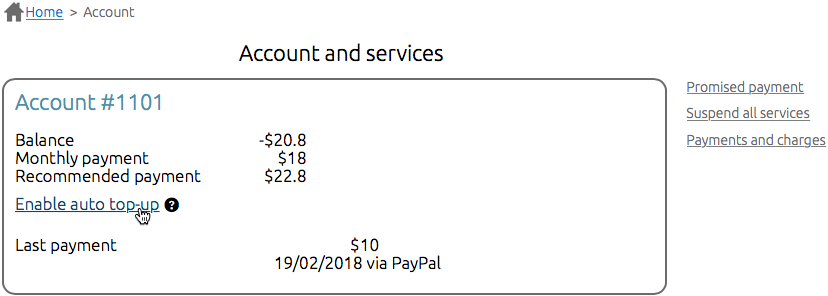
When the customer clicks Enable auto top-up he or she is redirected to a page for entering payment details.

If a subscription is created successfully the customer sees the corresponding message. In the future, he or she can disable auto top-up (i.e. cancel the subscription) anytime.

On the customer's page in the Service Provider Console, you can see if there is an active auto top-up subscription for the customer account.

Creating and Processing Autopayments
Payment requests and autopayments are processed in the following way:
- With each run, the Creating payment requests task checks if there is any payment request created for an account less than 10 days ago (the value from the rule for creating payment requests) and still pending.
- If no request is found and a customer has 3 days (specified in the rule) or less until a service paid from this account gets deactivated, a recommended payment is calculated.
- If the amount of the recommended payment falls within the range between the minimum and maximum amounts from the rule a payment request is created.
- An autopayment in the same amount is created on the basis of the payment request. And the limitations from the autopayment creation rule are applied (the maximum and minimum amounts, the monthly total amount and number of autopayments, the interval between autopayments). If an autopayment cannot be created the request becomes Unpaid and its processing stops.
- When, after creating the autopayment, the time specified in Period before charging passes the HPD agent makes an attempt to charge a card or an account in a payment system. If charging is successful the payment request becomes Paid and its processing stops.
- If charging fails due to a reason that makes all further charging attempts for the subscription useless the request becomes Unpaid. Thus, the subscription to auto top-up becomes Expired (if the charged card has expired), or Invalid (for example, when the transaction is blocked by the card issuer).
- If the reason for the failed charging allows further attempts, Hydra checks if the number of failures has reached the value specified in the autopayment creation rule. If not, with the next run the Creating payment requests task creates a new autopayment for this request (see step 4). Otherwise, the request becomes Unpaid, and the subscription to auto top-up becomes Invalid.
- If charging fails due to an internal error with the next run the task creates a new autopayment (step 4). When the number of failures equals three the subscription to auto top-up becomes Suspended. After troubleshooting the subscription can be resumed. So another autopayment will be generated for the previously created payment request.
Every 10 days (Period to search for previous request from the creation rule) for one account there can be only one pending payment request. However, there can be several autopayments for one and the same request if charging has not been carried out at the first attempt. Each autopayment corresponds to one charging attempt.
If due to failed charging attempts a subscription to auto top-up becomes Canceled, or its period is over, and a customer wants to resume auto top-up, he or she has to enter new payment details in the Customer Self Care Portal.