Setting Up Contract Plans
In this section
See also
Let's create a range of one-year IPTV contract plans for new customers. For all price plans within the range, customers are offered the same IPTV set-top boxes that cost $96.
A customer has 10 days to pay for the service provided in the previous month, i.e. there is a deferral for 10 days from the end date of the charge log. In case of a non-payment, a late payment fee is charged as 0.1 % interest on the overdue receivable. If the receivable remains unpaid for 15 days, the contract commitment is terminated. In addition, the customer is charged an early termination fee — the commitment amount remainder. So, even with early commitment termination, the customer is to pay the full cost of the IPTV set-top box.
The customer is to use the service for at least 4 months, but during the first 5 days he or she is allowed to withdraw from the commitment without paying the early termination fee.
To set up such contract plans you should follow these steps.
Creating a Service Providing Scheme
For contract plans you need a service providing scheme with a full charge at the start of a billing period.
If customers use only contract services, or pay for contract and non-contract price plans from different accounts, you should skip this step. Use the Full charge at charge log opening, 1 month preset scheme
If a customer uses one account to pay for not only contract, but also non-contract services, then the contract ones should have a higher priority. Copy the Full charge at charge log opening, 1 month scheme. Give a specific name to the new scheme in order to differentiate it from schemes for non-contract services, for example, Full charge with higher priority. Then change Service priority for a higher one.
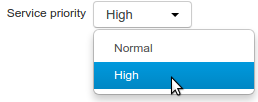
If you assign a normal priority to contract price plans, then Hydra Billing does not issue invoices unless the funds on the customer account are sufficient to pay for both the contract price plan and other provided services. It may lead to charging late payment fees or extending the contract period, even if the funds on the account are enough to pay for the contract price plan.
Creating Price Plans and Penalty Services in the Product Catalog
Contract terms are applied to subscriptions on the ground of service tags. Create tags for your product range in the registry of tags. These tags link contract terms to price plans in the product catalog. In our example we use the stb_contract_plans tag.
Create product catalog entries for the whole range of price plans, assign necessary tags and choose the service providing scheme.
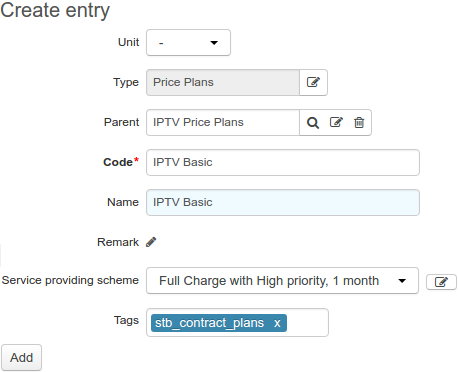
Contract price plans imply that there are fees charged when late payments for services appear, and some fee is to be paid for the commitment early termination. You need to create separate entries for the late payment fee and early termination fee in the product catalog. Add them in the Penalties section.
For the late payment fee, choose the Late payment fee type, and specify the charging period (1 day in our example), and the interest rate (0.1 %).
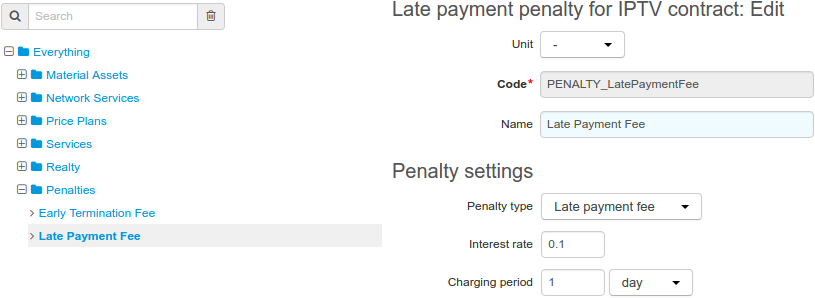
Similarly, choose the type for the early termination fee. There are no other settings for this fee in the product catalog, because the way Hydra Billing handles early terminations of contract commitments is set up later, in the contract terms.
If you want to charge for the resumption of contract commitments after the early termination fee has been charged, then add an entry for the resumption service in the Services section of the product catalog. In the service providing scheme, for this particular service you should specify, that it is Regular, One-off, Transaction-based, can be enabled/disabled by Operator only, and that the service providing point is Not specified. Further, this service should be included in the price specification for fees, and in the contract terms.
Creating a Basic Contract and Price Specifications
Create a basic contract for the contract plans. Plans will be available only to those customers whose service contracts are connected to this basic one.
Contract price plans are also available to existing customers who want new services: to add IPTV to the already provided Internet connection, or simply to get connected at a different address. Typically, such customers already have contracts created on the ground of basic ones for non-contract services. In order to give them access to contract plans, you can create new contracts for them on the ground of the basic one for contract plans. Thus, non-contract and contract services will be provided according to different service contracts.
Add a price specification to the basic contract. In its heading, set up the deferred payment.
In contract price plans, you should always apply the deferral from the end date of a charge log.
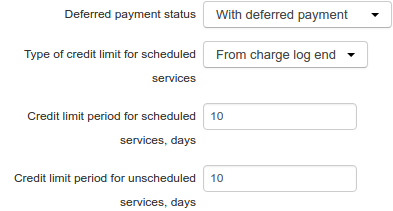
Specify the subscription fee for all price plans of the range.
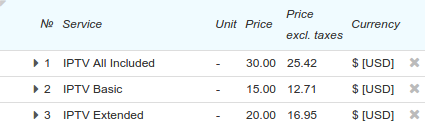
The commitment amount (in our example — the cost of the IPTV set-top box) is $96. The contract period is 12 months, so with each full monthly payment for the provided service the commitment amount remainder is to be decreased by 96/12 = $8.
Add a separate price specification for fees to the same basic contract. Specify the method of price calculation as Based on price incl. taxes, and prohibit deferral.
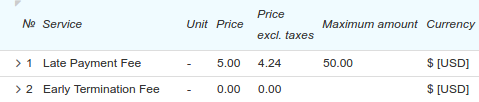
The late payment fee consists of two parts: the percentage and the fixed one. The percentage part is set up in the product catalog. And in the Price column in the price specification you can specify the fixed part. When overdue receivables appear, this type of fee is charged to a customer on the one-off basis.
If the fixed part is unnecessary for you, you should set up the price equal to 0. If, on the other hand, you need only a one-off charge, you should make the interest rate equal to 0 in the product catalog.
For late payment fees, you can set the maximum amount. If the contract commitment is active, and the total amount of fees has reached the defined value, then the commitment is terminated, and fees stop to be charged. In this case, an early termination fee is charged to the customer. But if at the time when the maximum amount is reached the commitment has the Awaiting payment status, the fees simply stop to be charged.
The price of the early termination fee is used only when calculating compensation of the Payment for minimum period type. The value from the price specification is added to the amount the customer has to pay for the number of months remaining of the minimum period.
If you want to use the resumption service for an early terminated commitment, set its price in this price specification too.
Adding Contract Terms
Add contract terms to the basic contract. Name it appropriately (the name is shown in the service contract then), enter the contract duration (12 months), and the minimum period for using the service (4 months).
Specify, services with which tags this contract conditions applies to. Services are to have all necessary tags as specified in the terms. Enter the trial period (5 days in our example) and the contract commitment amount.
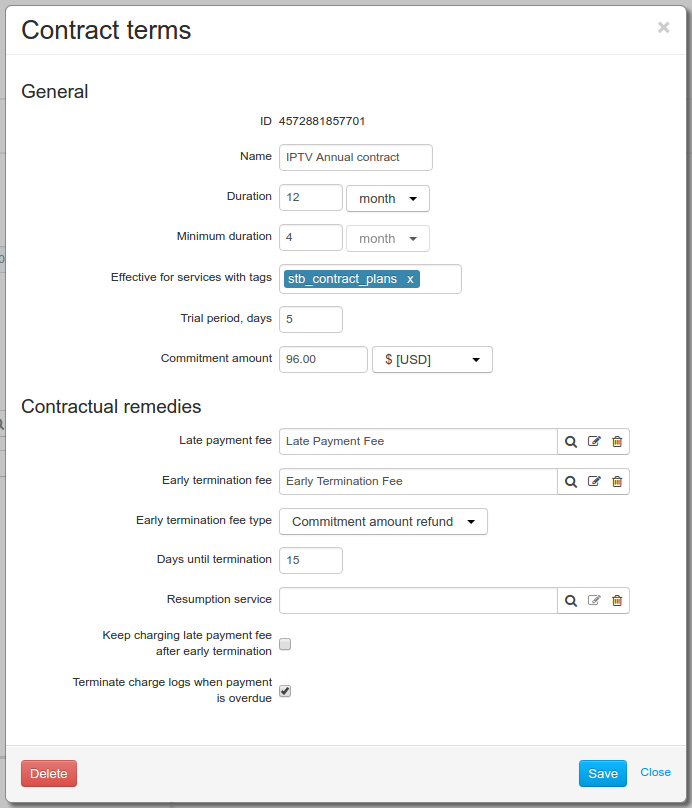
Set up the contractual remedies. In Late payment fee and Early termination fee, choose the penalty services which have been added to the price specification. Choose the fee type for the commitment early termination. In our example the customer is to pay back the commitment amount remainder (i.e. the remainder of the set-top box cost).
When you carry out an early termination of a commitment with the help of a special action, you can choose another method of fee calculation. As the terms specify the minimum duration, you can claim that a customer, instead of paying back the commitment amount remainder, pays for the service over the required months.
Select the Terminate charge logs when payment is overdue check box, so that if there is a late payment, the service stops to be provided.
If the customer does not pay off the arrears within 15 days, then the commitment is terminated. After that, late payment fees are not charged, unless the Keep charging late payment fee after early termination check box is selected.
If necessary, select Resumption service. This service is to be rated if you cancel the early termination fee.
The contract terms are set up. Now when creating a subscription to the IPTV Basic service, Hydra Billing creates a contract commitment for the customer and monitors its fulfillment.
You can change contract terms specified in the basic contract. New conditions will be applied only to new subscriptions. Contract commitment that are currently in force do not change.
Individual contract terms in service contracts cannot be changed if contract commitments have already been created on their basis.