Comments
To edit and add new comments, you need the appropriate permission.
Hydra Billing allows you to add comments to any system entities: objects, subjects, and documents. In general, comments are reminders for any changes in entity settings: planned or implemented (for example, a price plan changing, a reminder to phone a customer at a particular time, a customer receiving a bonus, and so on).
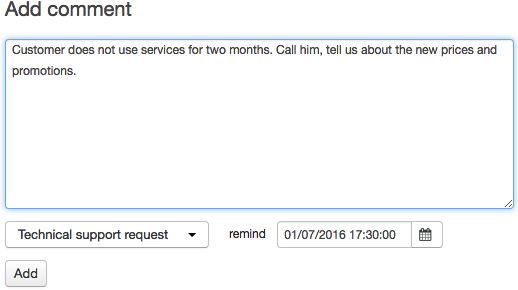
To add a comment go to the Comments tab and type it in the Add comment box. Choose the comment type from the list (the types are specified in the reference data). If necessary, set the date and time of the reminder, so the comment will appear in the Reminders widget. Click Add.
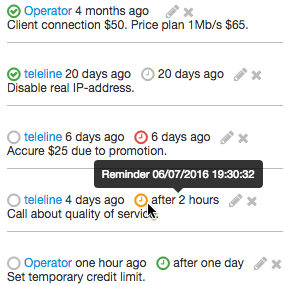
All comments are shown in a list with icons and tooltips, that help track the status of each comment.
As we see, there is a four-month-old comment from the user Operator about connecting a customer which is marked as done  . The remaining comments on the list are marked with different colored icons on the right. They indicate that these comments are reminders of different statuses: the reminder date to accrue $25 has already passed
  , the reminder date about the feedback call on the service quality in less than one day
  , and the reminder date for setting the credit limit — in one day
  .
.  shows that the reminder has been executed.
You can mark or unmark your own comments as done at any time by clicking  or .
or .
To edit a comment, click  and make the necessary changes. To delete a comment, use
  .
.
With the appropriate permission, you can perform all those operations with comments entered by anyone.
The quick search function by comments is also available.