Reports on Payments
In this section
See also
- Payment Documents
Reports on payments are used to analyze the movement of funds on customer and settlement accounts. They are created on the ground of payment documents. The most common applications of these reports are:
-
analyzing trends in average monthly revenue per customer,
-
analyzing incoming payments from various groups of customers,
-
reconciliation with the accounting department, or
-
detecting missent payments and investigating cases of permissions abusing.
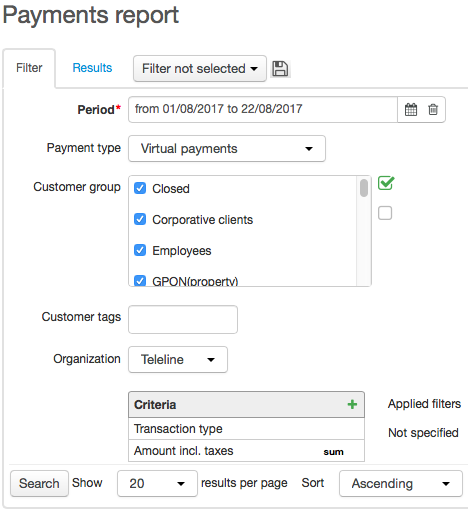
Choose the type of payments. Real payments show the funds movement on settlement accounts of individuals and organizations, that act as payees and payers. Virtual payments show the funds movement on customer accounts within Hydra Billing, where customers and operators act as receivers and suppliers.
Choose necessary groups of customers to build a report.
When settlements in Hydra Billing are carried out in several currencies simultaneously, you should add the Currency criterion, in order to group the data by each of the used currencies.
Aggregated Payments over a Period
One of the most commonly used reports is the determining the amount of payments received over a certain period, for example, over the current month.
In Period, choose Current month, in Payment type — Real payments. Specify customer groups whose payments are to be included in the report. Add criteria: Transaction type, Amount incl. taxes, Currency. For the Amount incl.taxes criterion, apply the Sum function.
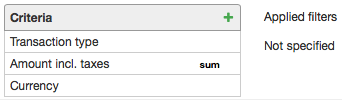
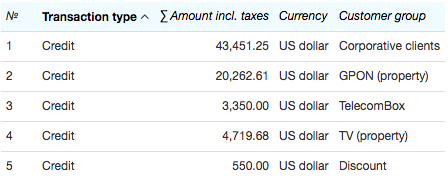
As a result, the following report is created.

If you want to determine the amount of payments per each of the customer groups, add the Customer group criterion and clear the Group check box in its settings. Thus, the payments made by customers that belong to several groups at the same time would be considered only once.
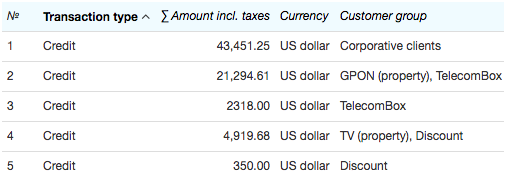
If for the Customer group criterion, the Group check box is selected, then payments made by customers that belong to several groups (for example, TV (property) or Discount), are aggregated in rows for each of the groups, and the total amount of payments is incorrect.
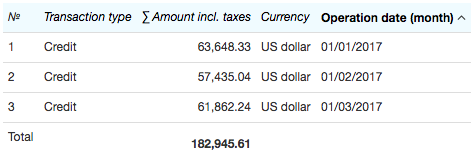
In order to analyze the changes in aggregated monthly payments over the first quarter of the year, choose the corresponding time interval in Period, and select the necessary customer groups. Add the Operation date criterion to the report, and in its settings specify the duration of a period for calculating the aggregated payments by choosing the Month unit.
Average Payments over a Period
Let us suppose that you need to view average amounts of real funds that have been paid every week over the previous month by certain customers, for example, by individuals.
On the Filter tab, enter the necessary month in Period, choose the Real payments type, and select the required customer groups.
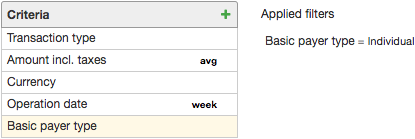
To create a report, you will need the following criteria: Transaction type, Operation date, Amount incl. taxes (or Amount excl. taxes), Currency, and Basic payer type. As you need to view average payments, apply the AVG function to the Amount incl. taxes criterion.
Now you need to specify the period the average payment is to be calculated for: thus, for the Operation date criterion you need to choose Week in Unit.
For the Basic payer type criterion apply the condition to be equal to Individual (without applying this condition the report would contain average payments for individuals and organizations separately).
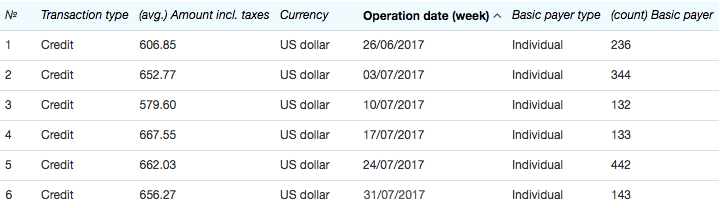
The created report appears as follows.
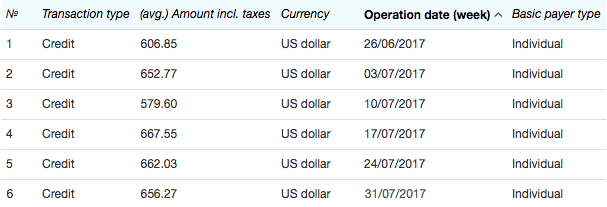
In our case the report contains 6 rows in terms of the number of weeks the days of the month fall into: the first row shows the payments made on July 1 and 2, and the last — those on July 31.
In order to get additional information on the number of individuals who have made the payments, you should add the Basic payer criterion and apply the COUNT function to it.
Payments by Types and Accounts
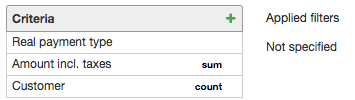
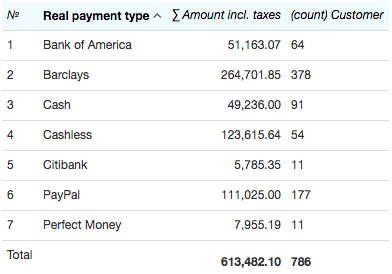
Using such criteria as Real payment type and Virtual payment type you can analyze trends in the funds flows via different payment systems. For example, if you want to view the number of customers that have used any particular payment system over the previous month, you should choose the necessary period, enter Real payments in Payment type, add the following criteria: Real payment type, Amount incl. taxes and Customer. Apply the SUM function to the Amount incl. taxes criterion, and the COUNT function to the Customer criterion.
The report is created as follows:
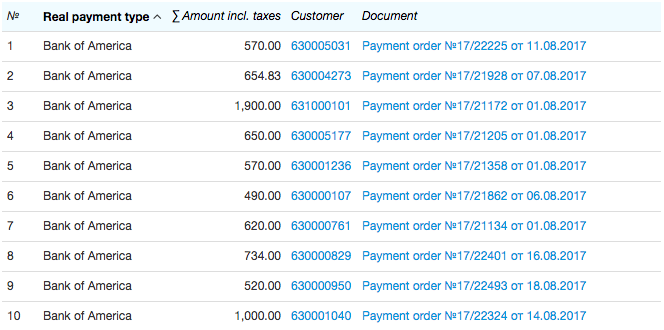
In order to search for all customers who have used some particular system, for the Real payment type criterion apply the condition to be equal to this system, Bank of America for example, and remove the COUNT function in the Customer criterion settings. If you also add the Document criterion, then the report would contain corresponding payment orders.
With the help of the Receiver account criterion you can create reports as per accounts in order to, for example, monitor the funds incoming via any particular cash desk, or your settlement account. To do so, add the condition to be equal to a necessary account to this criterion.
Searching for Payments by Payers and Receivers
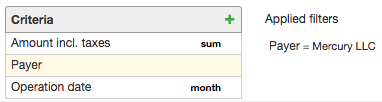
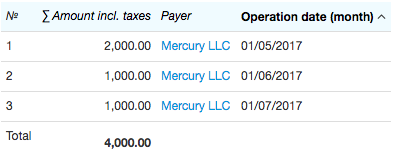
The Payer criterion can be used when searching for payments received from an individual or an organization. For example, when searching for the amount of funds paid by some particular organization over several months, you should enter the required interval in Period, and add the following criteria to the report: Amount incl. taxes, Payer, and Operation date. Apply the SUM function to the Amount incl. taxes criterion, specify Month as a unit for the Operation date criterion, and for the Payer criterion apply the condition to be equal to an organization.
In the created report you can view summed up monthly payments made by the given organization.
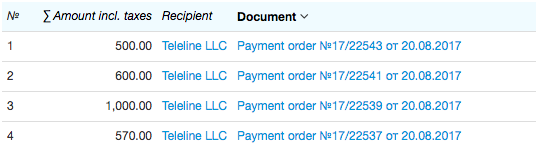
With the help of the Recipient criterion you can search for payments made by a certain customer over the specified period. To do so, choose Virtual payments in Payment type, and add the Amount incl. taxes, Recipient, and Document criteria. For the Recipient criterion, set the condition to be equal to the required customer.