Reports on Calls
In this section
See also
- CDR Registry
With the help of the CDR registry (Master Data → Telephony → CDRs) you can view both particular calls in detail and summaries on, for example, duration or cost of a certain customer's or provider's calls. The registry is also useful when searching for calls that have not been rated for some reason.
Searching for Customer's Calls
Let's assume that you need to view all calls a particular customer made over the last month. Enter the month in Period, specify the organization and the necessary provider. In Customer choose the necessary customer. Add the following criteria to your report: External ID, Rating status (it should be equal to Charged), Call start date, Call duration. You should also add criteria that contain necessary details on the initiator and the receiver.
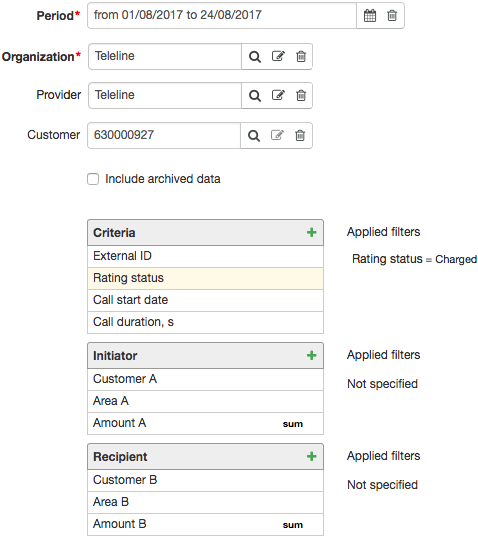
The report contains all calls the specified customer has taken part in either as the initiator or the receiver.

If you need to search only for calls initiated by the customer, you should apply the condition for the Customer A criterion to be equal to this customer.
In order to view the total duration and cost of the calls made by the customer, you should set up the criteria as follows:
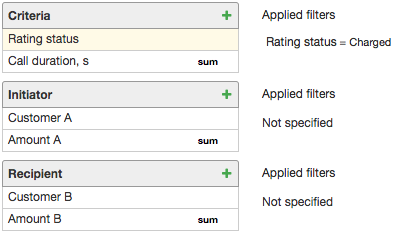
The created report contains the total number of seconds the customer has used and the cost.
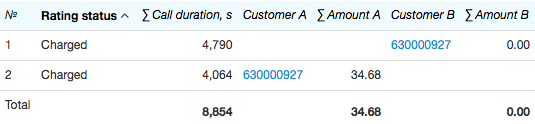
In the example above, outbound calls lasted 4064 s, and inbound ones — 4790 s.
Viewing Calls by Providers
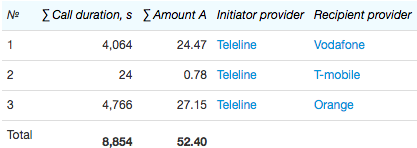
Now let us define the total cost of calls made by a certain provider's customers. Enter the required period and the organization, and leave Provider and Customer empty. Apply the following criteria: Rating status (apply the condition for it to be equal to Charged and clear the Display check box), Call duration (apply the SUM function to it), Amount A (also apply the SUM function to it), Initiator provider (apply the condition for it to be equal to a certain provider), and Recipient provider.
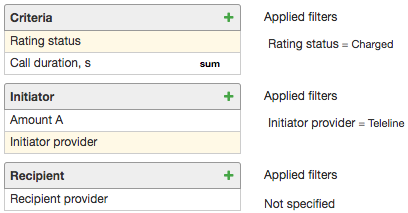
The created report contains the total duration and cost of outbound calls processed by the chosen provider, and the calls are considered separately for each recipient provider.
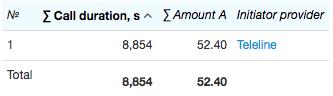
Without the Recipient provider criteria, the report is created containing total duration and total cost of outbound calls without details on the recipient provider.
In order to view both inbound and outbound calls via one certain provider, you should enter this provider in Provider on the Filter tab, and remove the filter from the Initiator provider criterion.
You can search for calls by provider by entering the provider in Provider and adding the External ID criterion to the report.
Viewing calls by Area Codes and Groups of Area Codes
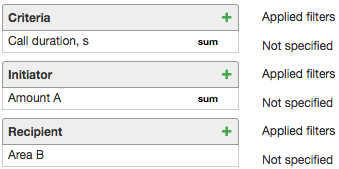
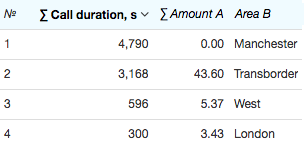
In some cases you need to view duration or total cost of calls made to certain area codes (for example, to define the most popular ones). In Provider choose the necessary one, and use such criteria as Call duration, Amount A (with the SUM function applied to both of them), and Area B.
Sort out the results by either the Call duration or Amount A column.
In order to view all calls by certain area codes, add more criteria to the abovementioned ones: External ID, Call start date, and Customer A. Make Area B equal to the necessary area, and clear the Display check box in its settings.
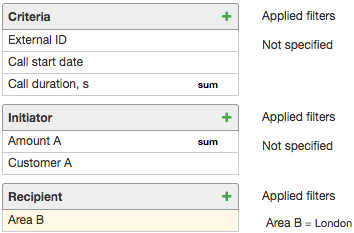
The report is created containing all calls made to the selected area over the specified period.
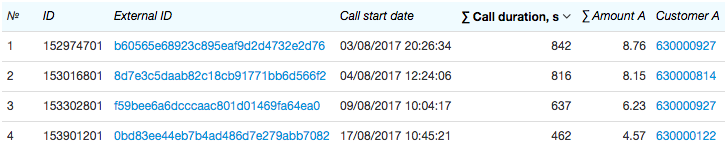
When phone services are provided by groups of area codes, i.e. in a price specification, groups of area codes are entered in Area, then you can create a similar report to display calls statistics by groups of area codes using the Group of area codes for recipient criterion instead of Area B.
Searching for Unrated Calls
Now let us search for all unrated outbound calls made over the previous month. In Period, choose the necessary month, and apply the following criteria: External ID, Rating status, Call start date, Call duration, Area A, Amount A, Initiator provider, Area B, Recipient provider. To the Amount A criterion you should apply the Not defined condition, and clear the Display check box so there is no empty column in your report. To the Initiator provider criterion you should apply the condition to be equal to the current provider.
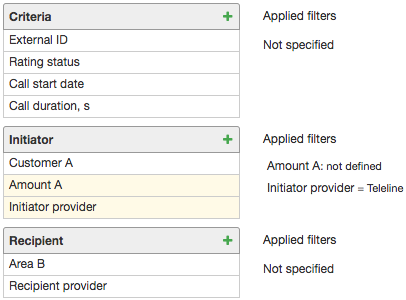
The report is created containing a list of calls together with the reasons (in Rating status) why they have not been rated.

Click the link in the External ID column to view the CDR with detailed information on the corresponding call.
Just as in the abovementioned reports, you can use additional criteria to limit your search to certain customers, area codes, etc.