How to Work with Invoices
In this section
See also
In this section, learn how to work with invoices in Hydra Billing, as a typical case of post-payment terms.
Creating Invoices
To create invoices, open Bulk Actions → Invoice Сreation. In most cases, you need to fill in the boxes just as shown below.
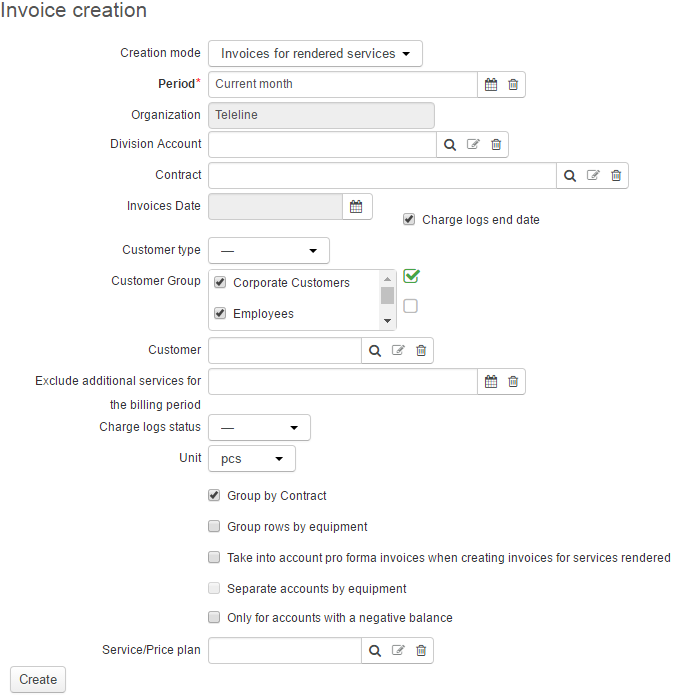
For more information concerning the invoice creation settings, see the Creating Invoices section.
Checking and Putting in Force in Bulk
Open the invoice registry (Documents → Invoices). On the Filter tab, in Date enter the date used as Invoices date when issuing invoices. Select the Draft status, enter your login in Author, click Search. On the Results tab, see the newly issued invoices.
Before you put invoices in force, go over the services and sums in them. To do so, use the bulk print function (click  on the Results tab of the invoices registry). When necessary, re-create invoices.
Put invoices in force in bulk.
Export Invoices
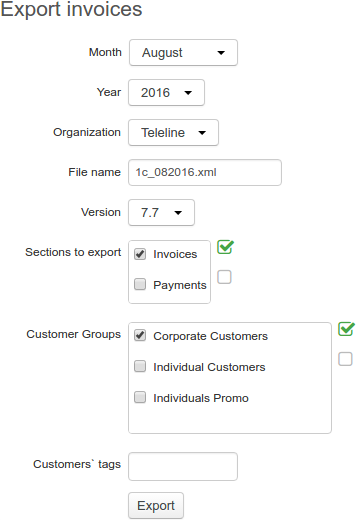
To export invoices from Hydra Billing to ERP software, open Bulk actions → Export Invoices.
-
Choose the necessary month and year.
-
Organization is populated automatically unless you use the Hydra Billing version for multiple divisions.
-
File name is generated automatically.
-
Select Invoices.
-
Select customer groups or enter customer tags.
-
Click Export.