Additional Actions
In this section
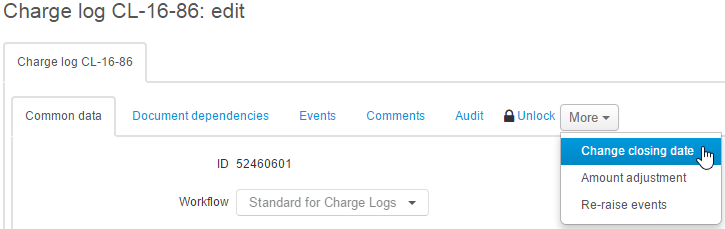
Changing a Closing Date
Use Change closing date in the More menu to shorten the charge log period (to close it on the current date as well), or, contrarily, to extend it. It is available only for such charge logs that are Prepared or In force.
You can shorten a charge log period if you have the Charge logs early termination permission from the Subjects section.
To extend a charge log period you need the permission to edit charge logs and the Charge logs extension permission from the Documents section.
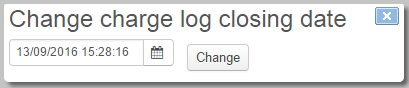
Enter the necessary closing date and click Change.
If the entered date is earlier that the initial closing date (i.e. it is an early charge log termination), then the system does the following:
-
matches a charge log row containing the main service (the price plan), which has a period the closing date falls into, and updates the end date in it;
-
depending on the value of the Early termination charging rule parameter for the main service, corrects the sum in this row;
-
updates the end dates and amounts in the rows for child services (excluding traffic services), regarding the values of the Early termination charging rule parameter for these services;
-
for traffic services, relocates child rows which refer to the main rows with the start dates later than the entered closing date, to the main row determined at the first step;
-
deletes all main rows with begin dates later than the charge log closing date;
-
changes the charge log period;
-
if the the charge log closing date is earlier or equal to the current date, transfers the charge log into the Executed status.
When extending the charge log period, i.e. in case the new closing date is later than the initial one, all rows in the contents (excluding those with traffic services), with end dates the same as the initial closing date have the date replaced with a new one. Consequently, the charge log period changes too.
When extending the charge log period, the charging amounts in it remain the same. For example, if there are daily charges for the main service, and you would like to extend the charge log period for 3 more days, then the customer would use the service without charges for these days.
Adjusting Amounts
Charge log contents for one and the same service, for example, for inbound Internet traffic, or for an international phone service, may contain a great number of rows, with a price, a quantity and a total amount specified for each one. And amounts in each row are rounded to two decimal digits. It is possible that a price for a certain traffic service multiplied by the total quantity then does not match the total cost of a service as per the charge log (summing is carried out by all rows of the charge log containing this service and the same price per a service unit). This discrepancy is caused by rounding. It leads to the situation when in a customer invoice the sum of the tax amount and the cost of services exclusive of taxes does not match the total amount of the invoice.
Use Adjust amounts to distribute "extra" funds among charge log rows for service so that in terms of the charge log, the amount for this service would match the taxes amount added to the service amount exclusive of taxes. The discrepancy correcting mode depends on the price calculation method as per the corresponding price specification. According to the Based on price excl. taxes method, the total amount exclusive of taxes remains unchanged. Otherwise, the correcting is carried out without changing the service amount inclusive of taxes.
In case of discrepancy, adjusting amounts in the charge log may lead to changes in the customer account balance.
Adjusting amounts is also used when creating invoices.
Re-Raising Events
This function is used for re-raising events for activating and disabling services included in the charge log.
Typically, generating events is carried out automatically when changing a charge log status, adding a new service, etc., so function calling for manual events re-raising is not required. However, it can be used, for example, in case an event for a service activation is created in the system after a charge log for this service has been issued.