Loading Prices for Phone Services from a File
For your convenience, you can load prices for phone services from a UTF-8 CSV file, the row in which is to be of the following format:
[service];range_start[-range_end];[name_of_area_code];[price_for_code];[name_of_area_code_group];[comment];[price_for_group]
Loading is possible only if there is a traffic classes specification entered on the General tab of the price specification.
For the decimal separator, a point or a comma can be used. For example, a typical file looks as follows:
-- Prices for phone services
National Call Out;1205;Alabama;0,02;National;
National Call Out;1315;New York;0,12;National;
National Call Out;1803;South Carolina;0,05;National;
National Call Out;1276;Virginia;0,90;National;
To load prices for the CSV file, click Load prices from file in the Contents section, so the Load prices from file window opens.
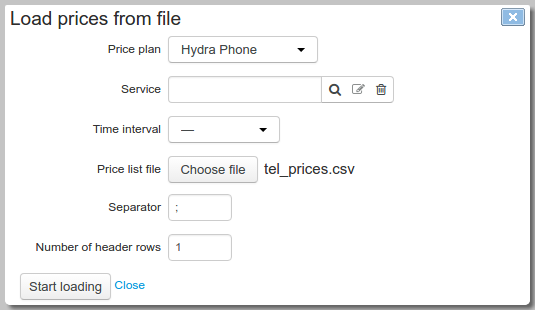
Choose the price plan where you need to add child rows. This price plan should be already added and saved in the price specification that is being edited. Specify the corresponding service from the Traffic services group of the product catalog (you can also leave it empty on the condition that the service is specified in the rows of the file) and choose the file. Choose the time interval for the loaded prices to be in force. If the interval is not specified (marked as «—»), the prices will be in force at any time. Specify the decimal separator as in the CSV file, and the number of rows in the heading. Click Start loading.
Loading is done in three steps. At the first two steps, the system processes the traffic classes specification and updates the registries of area codes and groups of area codes. At the third step, the prices are updated.
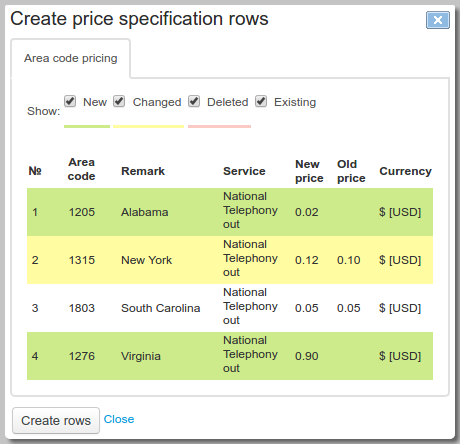
Data from the file is added to the specification as child rows of the Billing period specification type. When necessary, you can also add the rows of the Session specification type to them.