Subscriptions to Services
In this section
See also
- Subscription Migration Plans
- Contract Terms and Commitments
- How-To Manage Contract Plans
In the Subscriptions to services column of the contracts table there is a list of services which are being provided or will be provided to a customer on the basis of a corresponding contract or annex to a contract. There are no traffic services in the table, their consumption data is sent to the system automatically.
Click in the Subscriptions to services column. A list will open containing subscriptions which are valid or will be valid in the future (such subscriptions are marked with yellow).
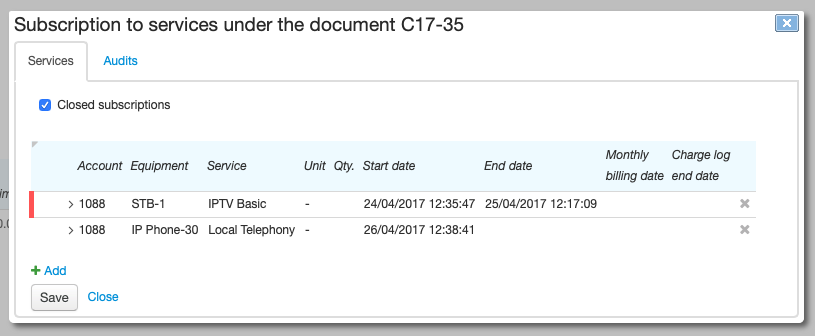
The Closed subscriptions check box is shown if there is at least one closed subscription under the document. Select it to view the history of subscriptions. Closed subscriptions, as well as the ones with expired periods but having valid charge logs based on them, are marked with red.
Creating a Subscription
To subscribe a customer to a new service, click in the Subscriptions to services column in a line with an appropriate document. Then click  Add. A new line line will appear in the Subscriptions to services under the document table.
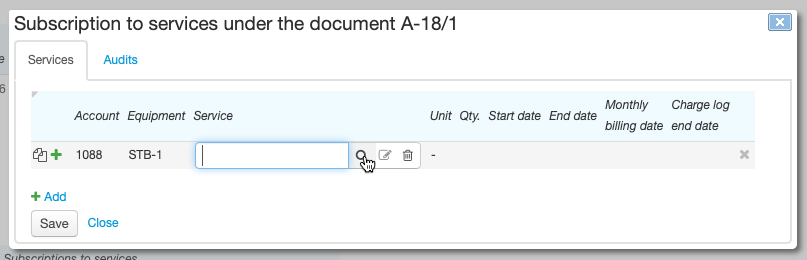
Enter Account that will be charged for the service. Enter Equipment, if necessary. When a customer has only one account and one piece of equipment, they are entered automatically.
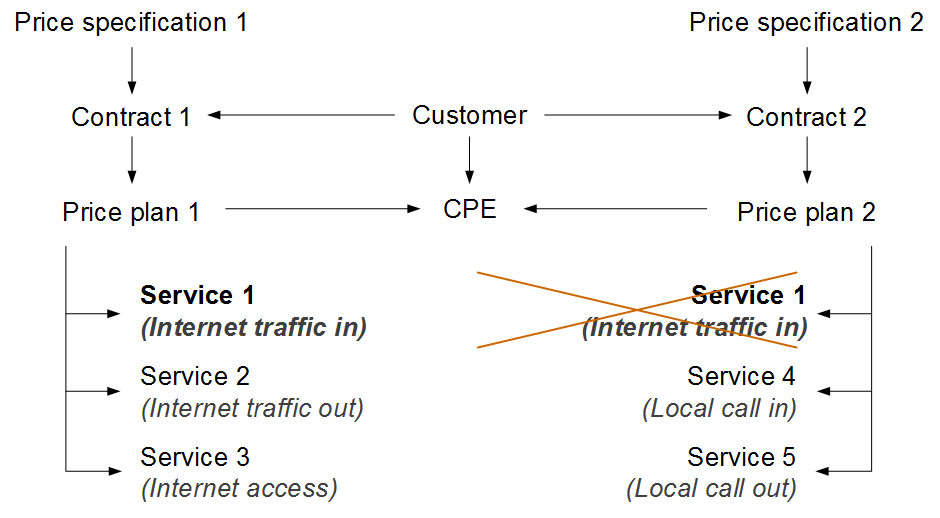
Services provided under one document (a contract, annex or addendum) are to be paid for from one account only.
On the same CPE and under the same document, only one price plan can be provided at a time.
Services provided (separately or within price plans) on one CPE according to subscriptions under several documents should not overlap.
Click  next to Service to see the list of services available to a customer.
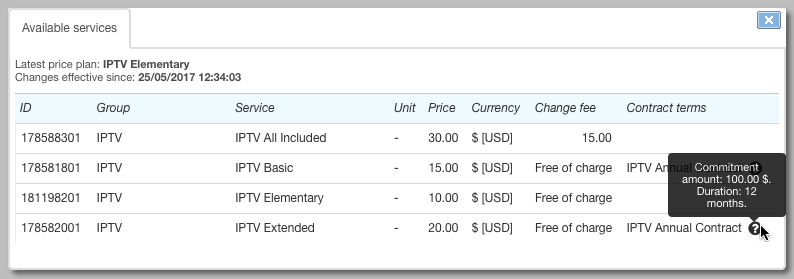
In the Change fee column there is a price of a subscription migration service according to a subscription migration plan in force. The change is free of charge if:
-
there is no plan in force for a customer,
-
the plan does not include such migration,
-
the subscription migration service is of zero value, or
-
the subscription migration service is not specified in any available price specification.
If there are contract terms defined for a service, they are shown in the column with the same name. Point to the icon to see a commitment amount and duration. The commitment is made when creating a subscription to the service. You can see it in the corresponding section of the customer contract.
Under one service contract there can be only one contract commitment. If this commitment has already been fulfilled (or canceled), and you want to subscribe the customer to a price plan with new contract terms, you should create a new contract for him or her, or add an addendum or an annex to the current contract. Then create a subscription under the new document.
Select a service. If it requires entering a quantity and a unit, the corresponding boxes are available, otherwise they are disabled.
Empty Begin date will be automatically populated with the current date when saving a subscription. By default, End date is not entered which means that the subscription is valid indefinitely. You can also enter specific dates to schedule the start of a subscription for a specific time or limit its duration.
You can enter Monthly billing date, e.g., for organizations or fixed telephony customers, that are served on credit with the billing period strictly tied to the calendar month. Otherwise, the billing date is determined by the date when a charge log is issued for a service, i.e. it can vary. To enter default billing dates for both individuals and organizations go to Administration → Parameters → Division parameters.
Enter Charge log end date in case of a one-off necessity to change the end date of a customer's billing period or terminate the service on a planned day (in the latter case, enter End date for the subscription as well).
To subscribe a customer to a service within a price plan, click  in a line with the plan. It can be a service included into this price plan but requiring an additional fee, for example, an extra package of TV channels.
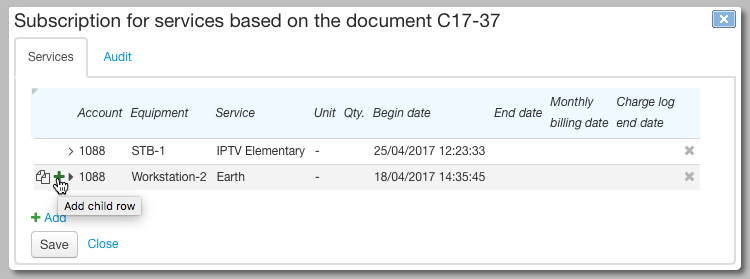
When you create a subscription to a price plan, sub-rows are automatically added for the subscription to access services which are included in the price plan and free of charge.
Editing a Subscription
You can change all subscription parameters (account, equipment, service and so on) before charge logs are issued on its basis or all of these charge logs are canceled. Otherwise, you can edit only: End date, Charge log end date and Monthly billing date.
End date is to be greater than the issue date of the latest uncanceled charge log for the subscription.
If Charge log end date falls within a period of a current charge log then this date becomes the charge log closing date, i.e. the charge log is to be closed early.
Changing Monthly billing date affects a period of next charge log that will be issued for this subscription. The period of the current charge log remains the same.
Changing a Price Plan
To change a customer's price plan, do the following:
- Open the subscription to the current price plan and enter a necessary End date, for example, the current date.
- If you want a new price plan to take effect at the same time as a new subscription, then in the current subscription enter Charge log end date equal to End date of the subscription. Otherwise, a charge log for the new price plan will be issued only as soon as the current billing period for the old price plan is over.
- Add the new subscription to the new price plan. In Begin date, enter the value one second greater than End date o the current subscription.
The subscription to the new service will get in force on the entered date. If at that moment no charge log is in force for the previous service then a charge log for the new service will be issued and the service will be provided to the customer.
When changing a price plan involves a migration service, Hydra will add this service to a new price plan while creating a new subscription. The service will be rated at the time the first charge log is issued for the new plan.
Managing Subscriptions via the Customer Self-Care Portal
A customer can change his or her price plan in the Self-Care Portal on the condition that the service providing scheme of the current plan has Permission to unsubscribe set to Customer or operator. To change the plan go to the Account and Services page.
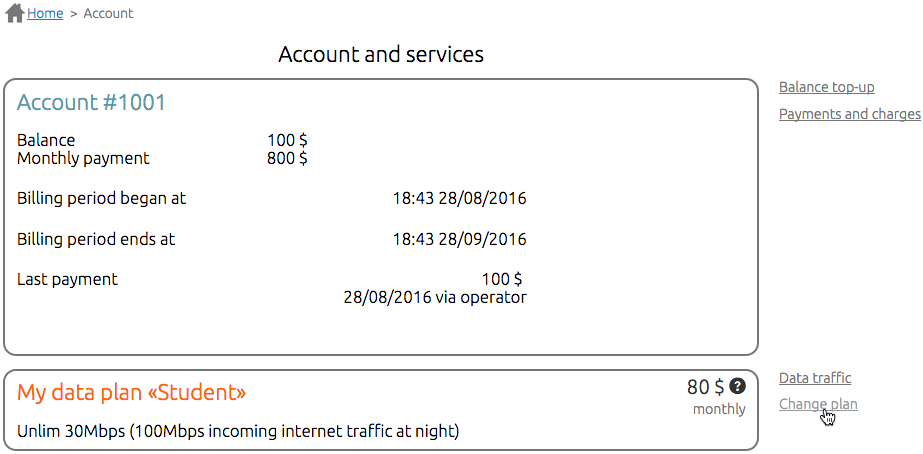
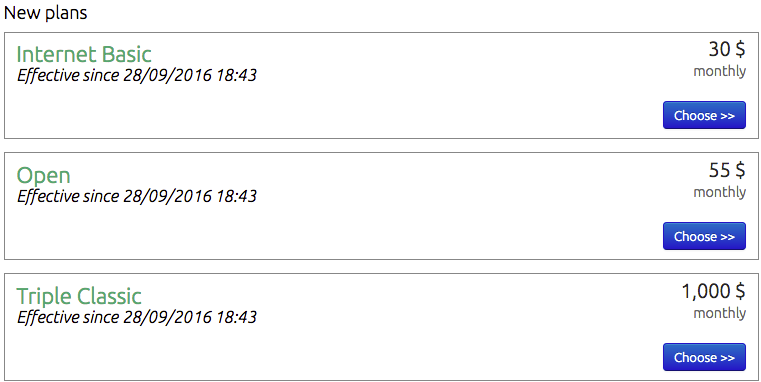
Click Change plan to open a list of available price plans with overviews and change fees according to a subscription migration plan in force.
After the customer confirms the change there will be information about the new price plan and its begin date on the customer account page.
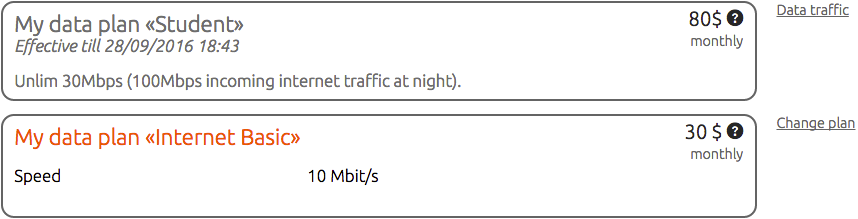
New price plan comes in force in the new billing period. To allow customers the immediate change of price plans, use the provided API.
The migration service is charged for when issuing a charge log for the new price plan.
If a customer decides to change the price plan again before the new one gets in force, the change fee is determined according to the plan which is currently in force (in the example shown, Student). Thus, returning to the current plan is free.
Once the billing period for the new price plan begins, the return to the previous price plan will be rated as another subscription migration.
When is a Service Available for Subscription?
A service is available for subscription when the following conditions are met.
Permission to Subscribe
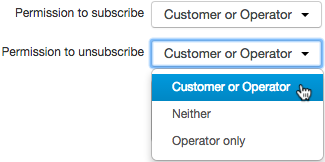
In a service providing scheme of the service Permission to subscribe is set to Customer or operator (via the Service Provider Console and the Customer Self-Care Portal) or Operator only (via the Service Provider Console).
The Service is in a Price Specification
The service is added to a price specification that is connected (directly or through a hierarchy of documents) to a customer's contract under which a subscription is created. A currency of a customer account is to be the same as the service price currency. The specification is in force and the subscription start date falls within its period.
The scheme shows the effect of the price specification period on the list of services available for subscription.
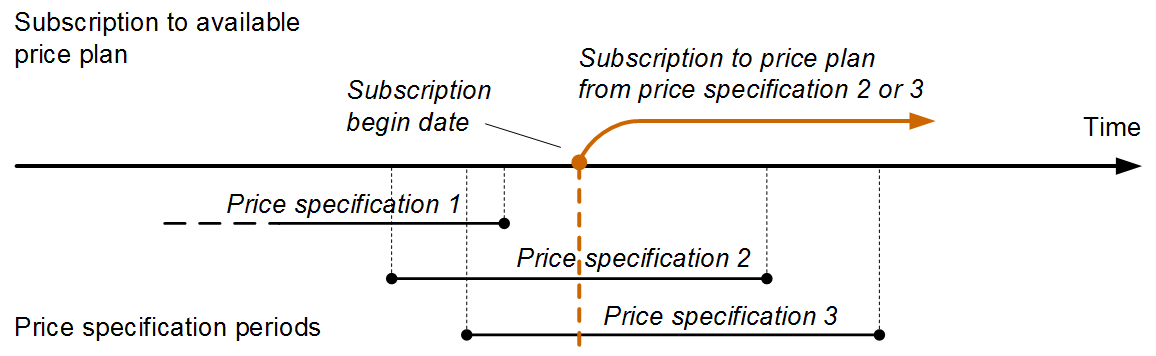
Scheme 7: Price specification period and availability of price plans
If the price specification period is nearing its end and the included services will no longer be provided to customers (as they will not be included in a new price specification), you should set the end date for these services in customers' subscriptions. The end date of the subscriptions is to be less than or equal to the end date of the price specification.
See the difference between the subscriptions history and the provided price plan history, which is determined by issued charge logs.
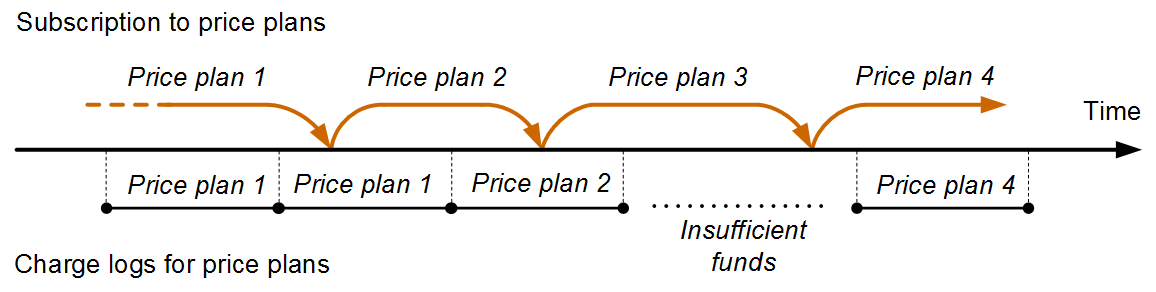
Scheme 8: Subscription periods and charge logs
In the beginning, a customer was subscribed and used Price plan 1. Then he or she changed for Price plan 2, but began to use it only after the charge log for Price plan 1 was closed.
While using Price plan 2, the customer changed the subscription for Price plan 3. Even though the customer was subscribed to Price plan 3 for several days, he or she wasn't using it: first, because the billing period of the previous price plan was not over, then due to insufficient funds.
After changing the subscription from Price plan 3 to Price plan 4, the customer started using the service as soon as the account balance was topped up.
At a zero or negative balance with no credit limit in force, the system does not issue any new charge logs (unless Providing condition is set to Sufficient balance is not required). All unissued charge logs are shown in the Ordered services section.
Providing the Service on CPE
In the product catalog, a type of equipment used in the subscription either has no bindings with the Allowed service type, or the service belongs to the list of allowed ones. At the same time, in the service providing scheme, Service providing point is set to Equipment or Can be specified.
If no CPE is used in the subscription, Service providing point is either Not specified or Can be specified.