Emergence of Receivables
When a charge log becomes Executed, a receivable is created for each service it contains. Receivables are to be paid off with a customer's funds. Either one receivable can be paid off with several payments, or one payment can be used to pay off several receivables. To allocate customer's funds to receivables, an automatic matching is used.
Receivables arise not only on the basis of charge logs, but also on the basis of payments, if their amount is negative. Receivables are also created when making payments from the customer's account.
To pay off receivables, only payments in positive amounts, received on customer's account, are used.
The period for paying off a receivable is calculated from the end date of a charge log and depends on the deferral parameters as per the price specification. The due date for a receivable is the end date of the deferral. If a payment deferment is not used, the due date for a receivable is the same as the end date of a charge log.
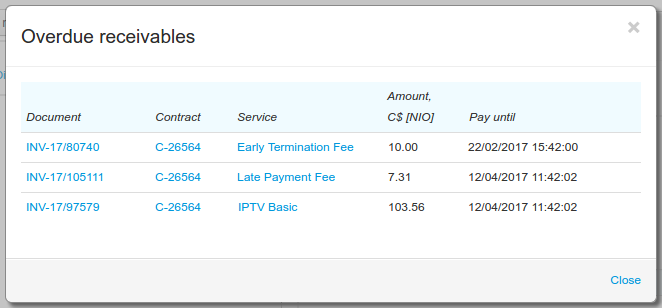
A receivable arises with the Outstanding status. If a receivable has not been paid off in time, it becomes Overdue. A paid off receivable is transferred into the Paid status.
Let us study a situation when the cost of a price plan for Internet access is $24 per month, and there is a 10-day payment deferment for scheduled and unscheduled services, from the end date of a charge log. For example, a charge log was in force from 2 p.m., February 1, to 1.59 p.m., March 1. At the moment of its closing, a receivable arises in the amount of $24 as a payment for the price plan. Its payment period is from 1.59 p.m., March 1, to 1.59 p.m., March 11. Also, receivables arise for unscheduled (for example, traffic) services that are within the price plan, and they have to be paid off until 1.59 p.m., March 11 too. Before the due date, the arisen receivables are Outstanding. At 2 p.m. on March 11 the receivables become Overdue.
You can view customer's current receivables if you open a customer account.
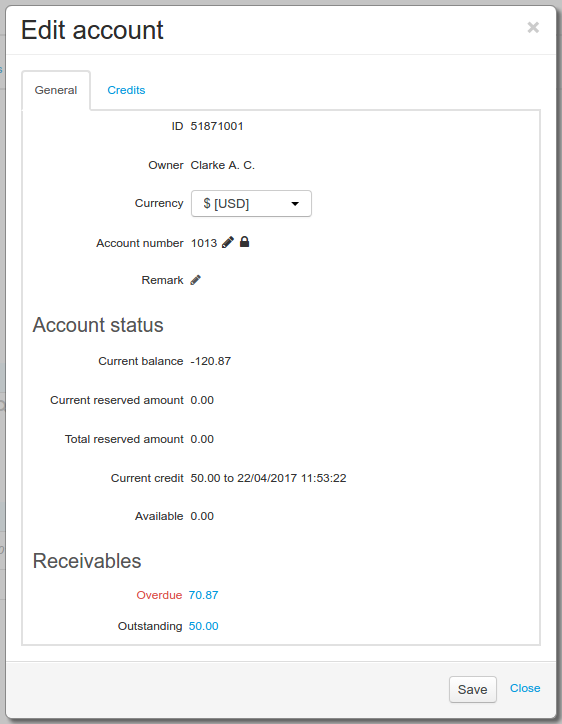
Here you can view the total amounts of receivables that are overdue and outstanding. Click the amount to see the receivable details with certain statuses, for example, for overdue ones.